


首先确认ip 地址
sudo cat /etc/netplan/00-installer-config.yaml
[sudo] password for shitou:

# This is the network config written by 'subiquity'
network:
  ethernets:
    ens18:
      addresses:
      - 192.168.31.5/24
      nameservers:
        addresses:
        - 202.102.224.68
        - 114.114.114.114
        search: []
      routes:
      - to: default
        via: 192.168.31.1
  version: 2
然后配置阿里源
deb https://mirrors.aliyun.com/ubuntu/ jammy main restricted universe multiverse
deb-src https://mirrors.aliyun.com/ubuntu/ jammy main restricted universe multiverse

deb https://mirrors.aliyun.com/ubuntu/ jammy-security main restricted universe multiverse
deb-src https://mirrors.aliyun.com/ubuntu/ jammy-security main restricted universe multiverse

deb https://mirrors.aliyun.com/ubuntu/ jammy-updates main restricted universe multiverse
deb-src https://mirrors.aliyun.com/ubuntu/ jammy-updates main restricted universe multiverse

# deb https://mirrors.aliyun.com/ubuntu/ jammy-proposed main restricted universe multiverse
# deb-src https://mirrors.aliyun.com/ubuntu/ jammy-proposed main restricted universe multiverse

deb https://mirrors.aliyun.com/ubuntu/ jammy-backports main restricted universe multiverse
deb-src https://mirrors.aliyun.com/ubuntu/ jammy-backports main restricted universe multiverse

/etc/apt/sources.list"
先更新软件源缓存
bash
运行
sudo apt update安装 qemu-guest-agent
bash
运行
sudo apt install -y qemu-guest-agent然后设置开机启动
 sudo systemctl enable --now qemu-guest-agent
Synchronizing state of qemu-guest-agent.service with SysV service script with /usr/lib/systemd/systemd-sysv-install.
Executing: /usr/lib/systemd/systemd-sysv-install enable qemu-guest-agent
The unit files have no installation config (WantedBy=, RequiredBy=, UpheldBy=,
Also=, or Alias= settings in the [Install] section, and DefaultInstance= for
template units). This means they are not meant to be enabled or disabled using systemctl.

Possible reasons for having these kinds of units are:
• A unit may be statically enabled by being symlinked from another unit's
  .wants/, .requires/, or .upholds/ directory.
• A unit's purpose may be to act as a helper for some other unit which has
  a requirement dependency on it.
• A unit may be started when needed via activation (socket, path, timer,
  D-Bus, udev, scripted systemctl call, ...).
• In case of template units, the unit is meant to be enabled with some
  instance name specified.
shitou@shitou:~$ sudo systemctl status qemu-guest-agent
● qemu-guest-agent.service - QEMU Guest Agent
     Loaded: loaded (/usr/lib/systemd/system/qemu-guest-agent.service; static)
     Active: active (running) since Fri 2026-07-03 17:25:38 UTC; 32s ago
   Main PID: 5122 (qemu-ga)
      Tasks: 2 (limit: 4630)
     Memory: 540.0K (peak: 796.0K)
        CPU: 26ms
     CGroup: /system.slice/qemu-guest-agent.service
             └─5122 /usr/sbin/qemu-ga

Jul 03 17:25:38 shitou systemd[1]: Started qemu-guest-agent.service - QEMU Guest Agent.
Jul 03 17:25:41 shitou qemu-ga[5122]: info: guest-ping called
Jul 03 17:25:56 shitou qemu-ga[5122]: info: guest-ping called
Jul 03 17:26:10 shitou qemu-ga[5122]: info: guest-ping called
、PVE 网页后台开启 QEMU 代理开关(必须操作,否则不生效)
关闭这台 Ubuntu 虚拟机;
进入虚拟机 → 选项;
找到
QEMU Guest Agent,修改为 已启用;保存,开机启动虚拟机。
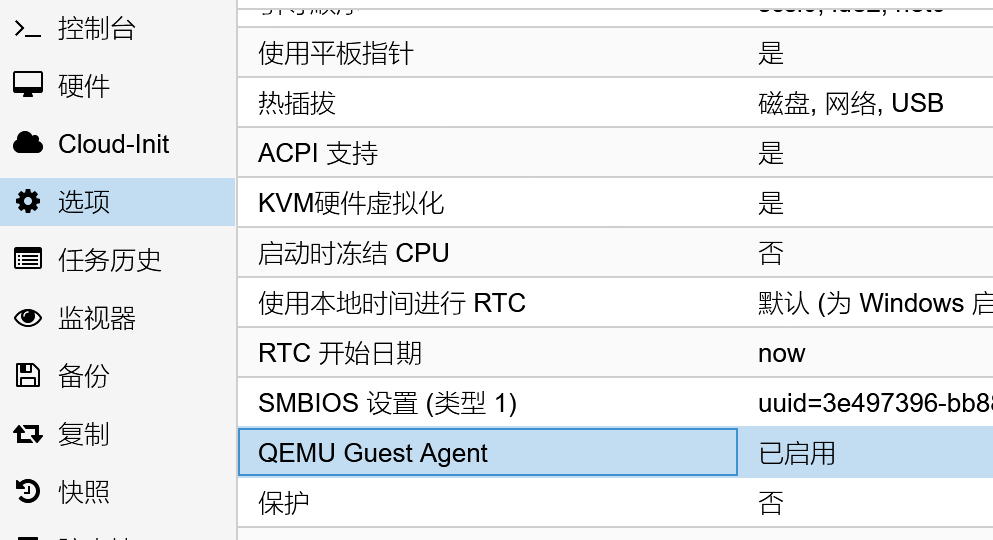
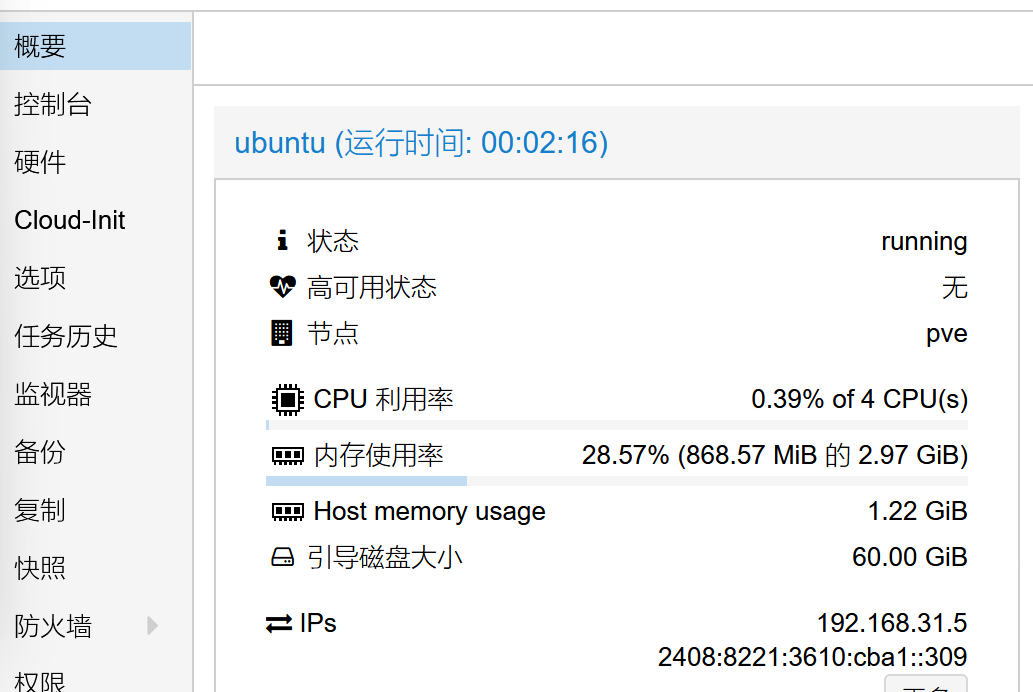
效果
原创
pve下的Ubuntu 24.04.安装Guest Agent
本文采用 CC BY-NC-SA 4.0 许可协议,转载请注明出处。
评论交流
欢迎留下你的想法