


#
interface Pos4/0/0
 link-protocol ppp
#
return
[Huawei-Pos4/0/0]
原理
ppp点到点,的协议,常见的广域网链路层协议,安全认证,pap密码验证协议 ,chap 挑战握手协议,
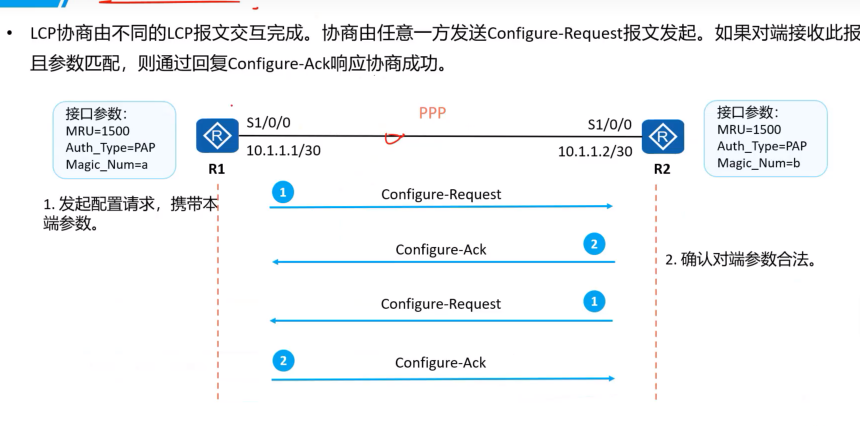
ppp协议提供了,LCP 链路控制协议,用于链路层参数的协商。例如最大接收单元,认证模式。有良好的扩展性,需要在以太网链路承载ppp协议时,可以扩展为pppoe
ppp协议各种ncp 网络控制协议,入Ipcp ip 控制协议,用于各网络层参数的协商,更好的支持网络层协议。
链路层协商,
认证协商,链路建立协商的阶段认证,
网络层协商,ncp 来协商,
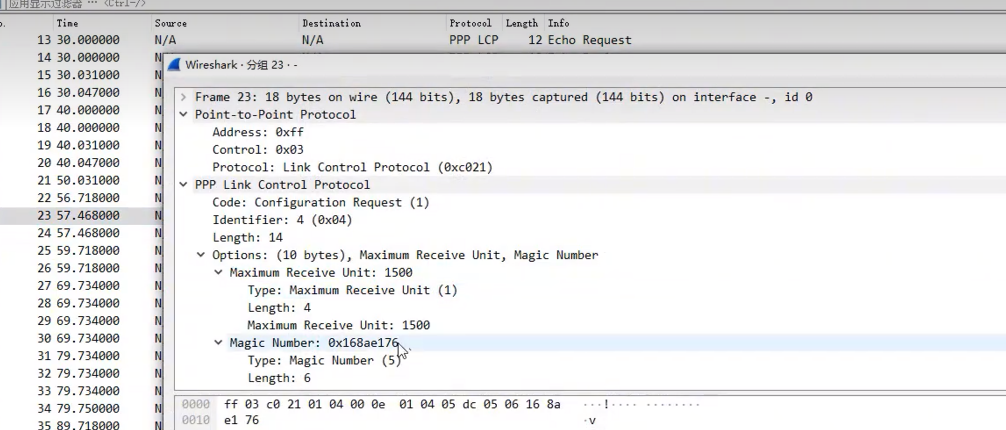
magic 用于防环,
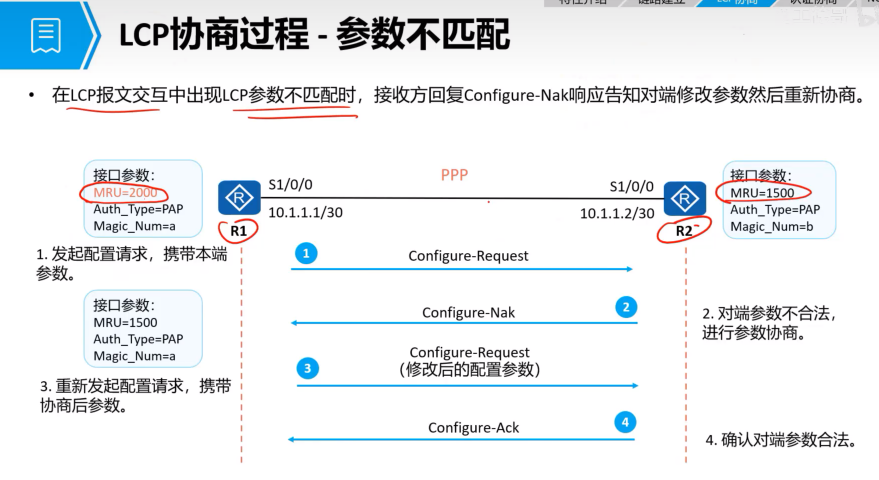
不匹配的话
接收的报文拆解
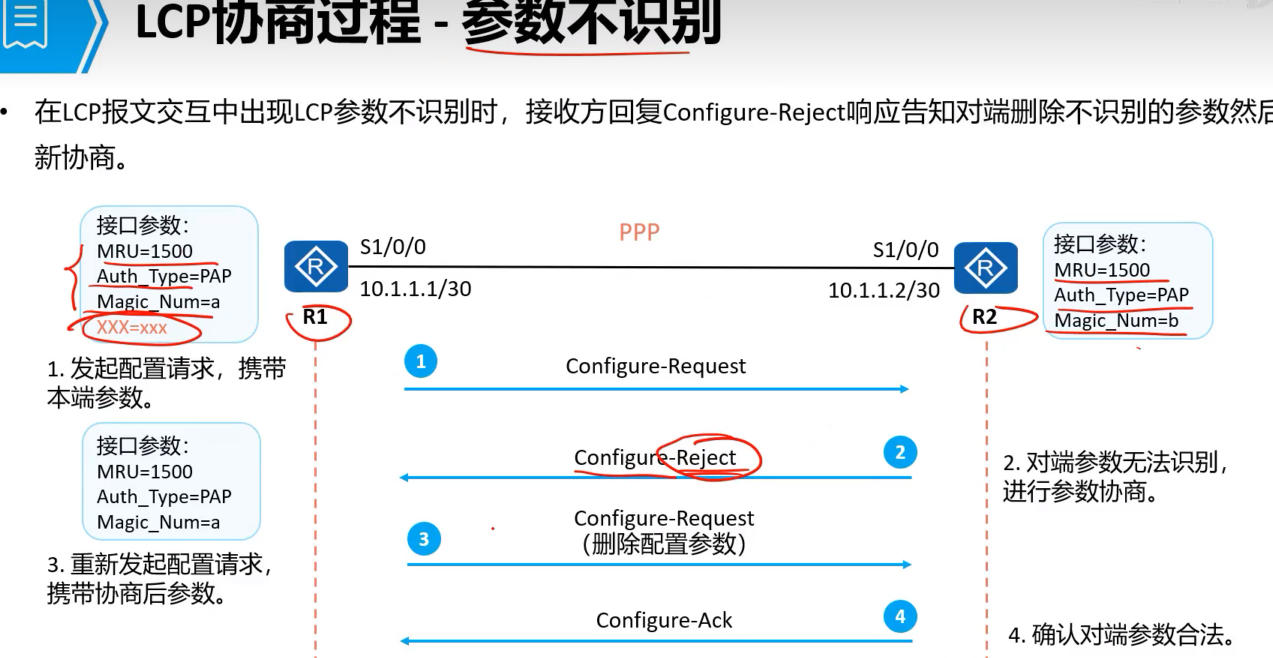
还有不识别的情况,
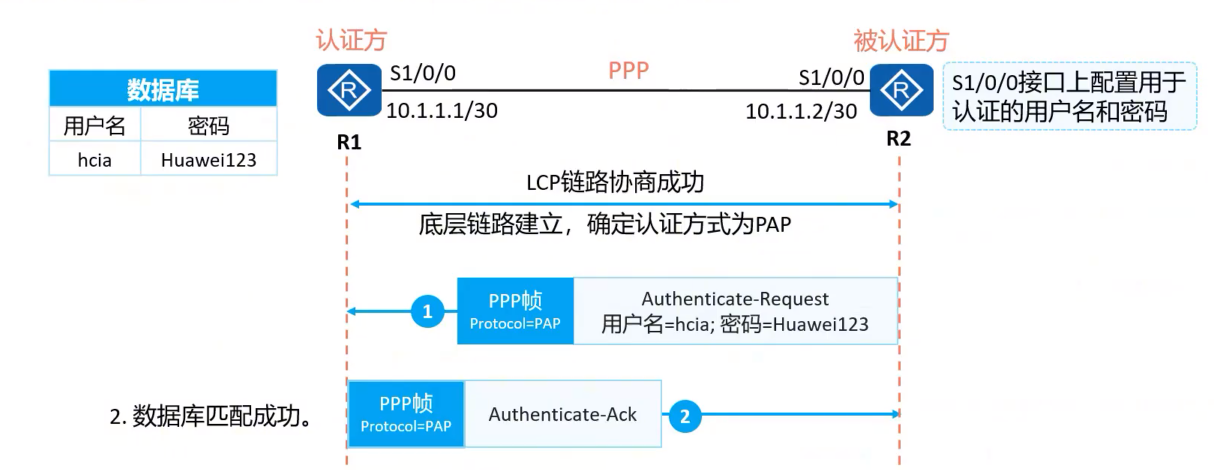
ppp 认证模式,pap chap
pap 认证有两次握手,协商报文以明文形式在链路上传输,
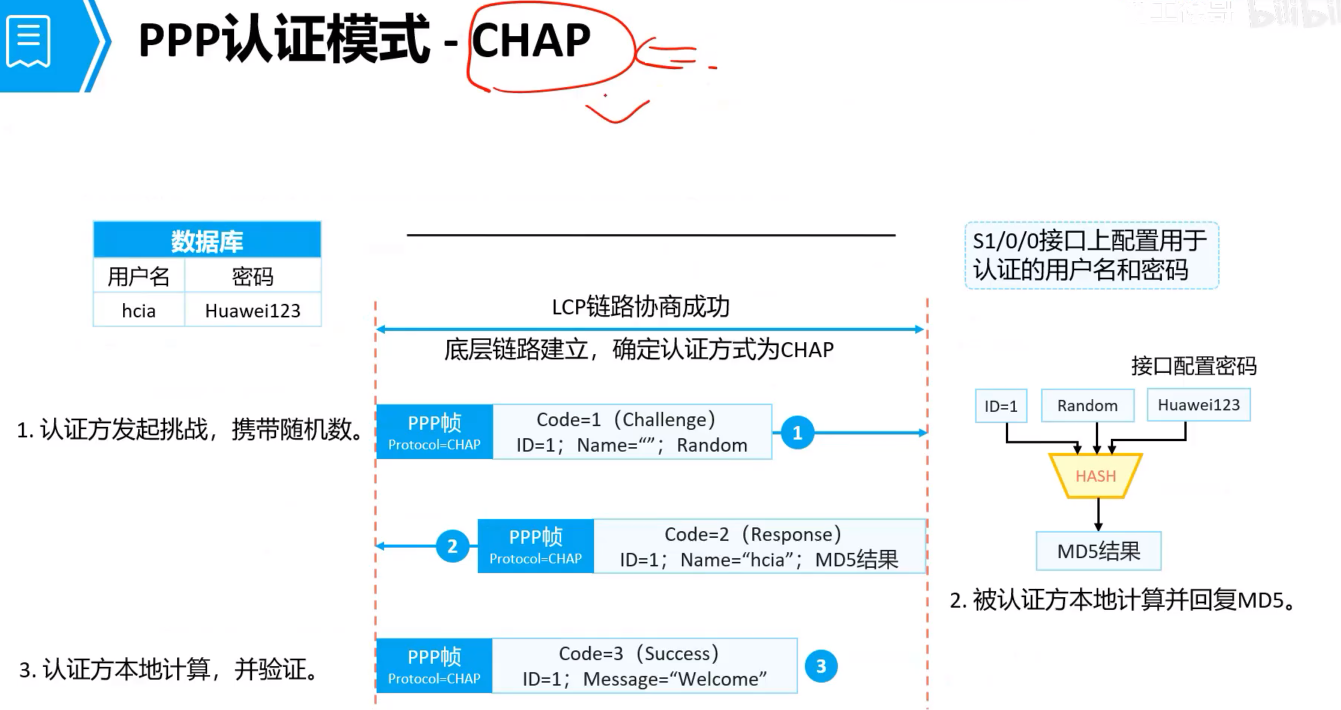
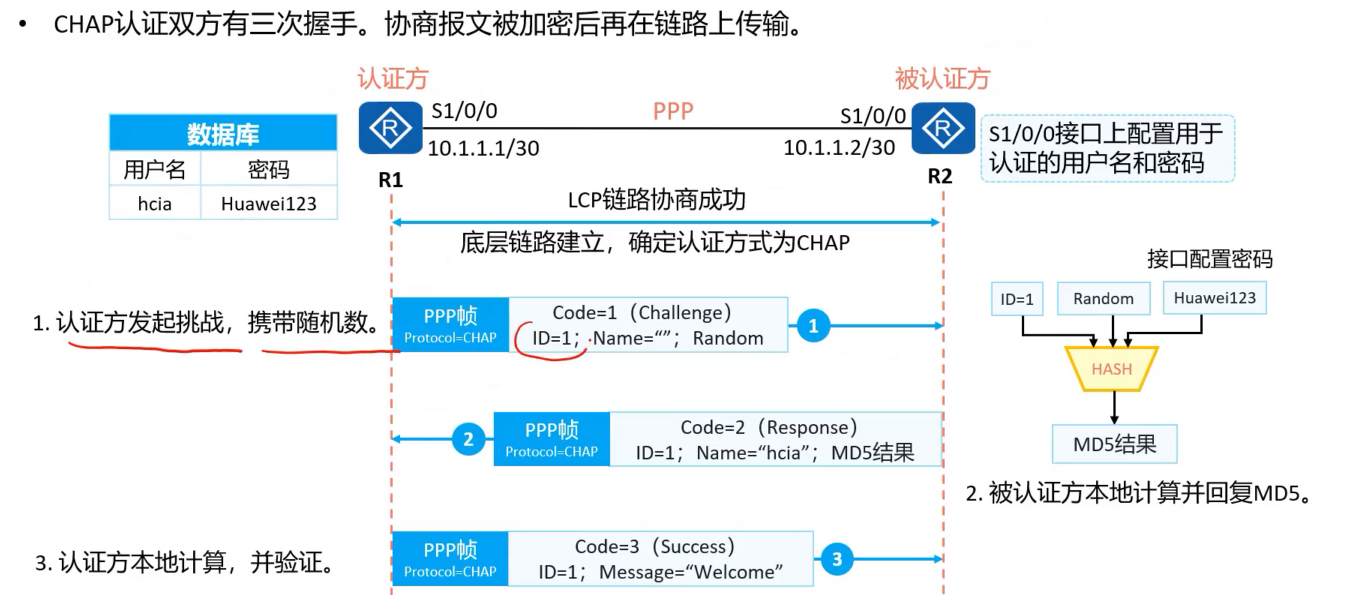
chap 认证,安全,一般都是这个方法,
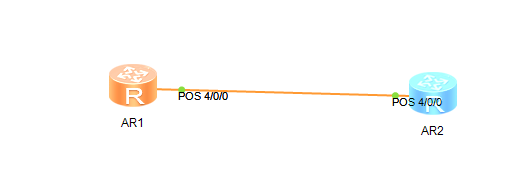
配置ppp
在AR1 上操作
<Huawei>sys
Enter system view, return user view with Ctrl+Z.
[Huawei]in
[Huawei]int 4/0/0
            ^
Error: Wrong parameter found at '^' position.
[Huawei]int p
[Huawei]int Pos 4/0/0
[Huawei-Pos4/0/0]dis this
[V200R003C00]
#
interface Pos4/0/0
 link-protocol ppp
#
return
[Huawei-Pos4/0/0]ip add 10.0.12.1 24
[Huawei-Pos4/0/0]
Jul 28 2026 22:47:17-08:00 Huawei %%01IFNET/4/LINK_STATE(l)[0]:The line protocol
 PPP IPCP on the interface Pos4/0/0 has entered the UP state.
[Huawei-Pos4/0/0]q
[Huawei]sysnam
[Huawei]sysname AR1
[AR1]
在AR2 上操作
[Huawei]int p
[Huawei]int Pos 4/0/0
[Huawei-Pos4/0/0]ip add 10.0.12.2 24
[Huawei-Pos4/0/0]
Jul 28 2026 22:47:18-08:00 Huawei %%01IFNET/4/LINK_STATE(l)[0]:The line protocol
 PPP IPCP on the interface Pos4/0/0 has entered the UP state.
[Huawei-Pos4/0/0]q
[Huawei]sysn
[Huawei]sysname AR2
运营商创建
[AR1-aaa]local-user huawei password cipher huaweiyaAR1-aaa]local-user huawei pa
[AR1-aaa]local-user huawei password c
[AR1-aaa]local-user huawei password cipher huaweiya
Info: Add a new user.
[AR1-aaa]dis this
[V200R003C00]
#
aaa
authentication-scheme default
authorization-scheme default
accounting-scheme default
domain default
domain default_admin
local-user admin password cipher %$%$K8m.Nt84DZ}e#<0`8bmE3Uw}%$%$
local-user admin service-type http
local-user huawei password cipher %$%$>^Ef(3Jx3PQ:W9,`y]d;nSxB%$%$
#
[AR1-aaa]local-user huawei service-type ? 给谁创建的,下面是几种类型,
8021x 802.1x user
bind Bind authentication user
ftp FTP user
http Http user
ppp PPP user
ssh SSH user
sslvpn Sslvpn user
telnet Telnet user
terminal Terminal user
web Web authentication user
x25-pad X25-pad user
[AR1-aaa]local-user huawei service-type ppp选择认证模式
进入接口,
AR1-aaa]q
[AR1]int po
[AR1]int Pos 4/0/0
[AR1-Pos4/0/0]ppp ?
  authentication-mode  Specify PPP authentication-mode
  chap                 Specify CHAP parameters
  ipcp                 Specify IPCP parameters
  mp                   Multilink PPP
  pap                  Specify PAP parameters
  timer                Specify timer
[AR1-Pos4/0/0]ppp
[AR1-Pos4/0/0]ppp a
[AR1-Pos4/0/0]ppp authentication-mode ?
  chap  Enable CHAP authentication
  pap   Enable PAP authentication
[AR1-Pos4/0/0]ppp authentication-mode pa
[AR1-Pos4/0/0]ppp authentication-mode pap
[AR1-Pos4/0/0]dis this
[V200R003C00]
#
interface Pos4/0/0
 link-protocol ppp
 ppp authentication-mode pap
 ip address 10.0.12.1 255.255.255.0
#
return
认证方
[AR2-Pos4/0/0]ppp ?
  authentication-mode  Specify PPP authentication-mode
  chap                 Specify CHAP parameters
  ipcp                 Specify IPCP parameters
  mp                   Multilink PPP
  pap                  Specify PAP parameters
  timer                Specify timer
[AR2-Pos4/0/0]ppp p
[AR2-Pos4/0/0]ppp pap ?
  local-user  Specify user name
[AR2-Pos4/0/0]ppp pap l
[AR2-Pos4/0/0]ppp pap local-user ?
  STRING<1-64>  User name
[AR2-Pos4/0/0]ppp pap local-user huawei password huaweiya?
                                                 ^
Error: Unrecognized command found at '^' position.
[AR2-Pos4/0/0]ppp pap local-user huawei password huaweiya ?
                                                 ^
Error: Unrecognized command found at '^' position.
[AR2-Pos4/0/0]ppp pap lo
[AR2-Pos4/0/0]ppp pap local-user huawei pa
[AR2-Pos4/0/0]ppp pap local-user huawei password ?
  cipher  Display the current password with cipher text
  simple  Display the current password with plain text
[AR2-Pos4/0/0]ppp pap local-user huawei password c
[AR2-Pos4/0/0]ppp pap local-user huawei password cipher huaweiya
chap
需要三次握手,
运营商,认证方,设置用户,认证方式,chap
[AR1-aaa]local-user  huawei pa
[AR1-aaa]local-user  huawei password c
[AR1-aaa]local-user  huawei password cipher huaweiya
[AR1-aaa]local-user huawei service-type ppp


以上不用操作,因为前面已经操作过了,如果是新的实验环境,或者实际操作,需要配置,
[AR1-Pos4/0/0]ppp a
[AR1-Pos4/0/0]ppp authentication-mode ?
  chap  Enable CHAP authentication
  pap   Enable PAP authentication
[AR1-Pos4/0/0]ppp authentication-mode ch
[AR1-Pos4/0/0]ppp authentication-mode chap
[AR1-Pos4/0/0]
家庭宽带被认证方
也就是AR2
[AR2]int p
[AR2]int Pos 4/0/0
[AR2-Pos4/0/0]ppp c
[AR2-Pos4/0/0]ppp chap lo
[AR2-Pos4/0/0]ppp chap lo
[AR2-Pos4/0/0]ppp chap l
[AR2-Pos4/0/0]ppp chap l
[AR2-Pos4/0/0]ppp chap
[AR2-Pos4/0/0]ppp chap u
[AR2-Pos4/0/0]ppp chap user huawei
[AR2-Pos4/0/0]ppp ch
[AR2-Pos4/0/0]ppp chap pa
[AR2-Pos4/0/0]ppp chap password huaweiya
                                ^
Error: Unrecognized command found at '^' position.
[AR2-Pos4/0/0]ppp chap password ?
  cipher  Display the current password with cipher text
  simple  Display the current password with plain text
[AR2-Pos4/0/0]ppp chap password ci
[AR2-Pos4/0/0]ppp chap password cipher huaweiya
[AR2-Pos4/0/0]
去除操作,pap认证方式
[AR2-Pos4/0/0]undo ppp o
[AR2-Pos4/0/0]undo ppp p
[AR2-Pos4/0/0]undo ppp pap l
[AR2-Pos4/0/0]undo ppp pap local-user
[AR2-Pos4/0/0]dis this
[V200R003C00]
#
interface Pos4/0/0
link-protocol ppp
ppp chap user huawei
ppp chap password cipher %$%$;t=.RFSr:*WsPDBqdO4:,%Z:%$%$
ip address 10.0.12.2 255.255.255.0
#
return
[AR2-Pos4/0/0]
最后会进行网络协商, NCP 协商配置ip
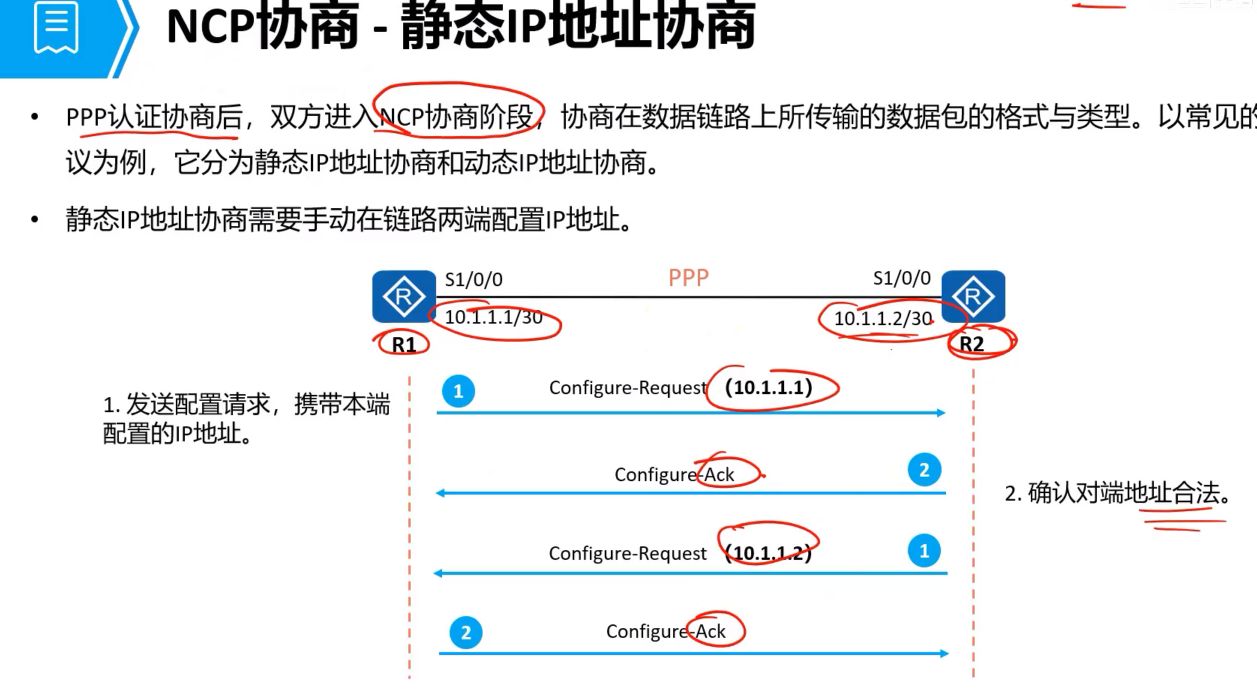
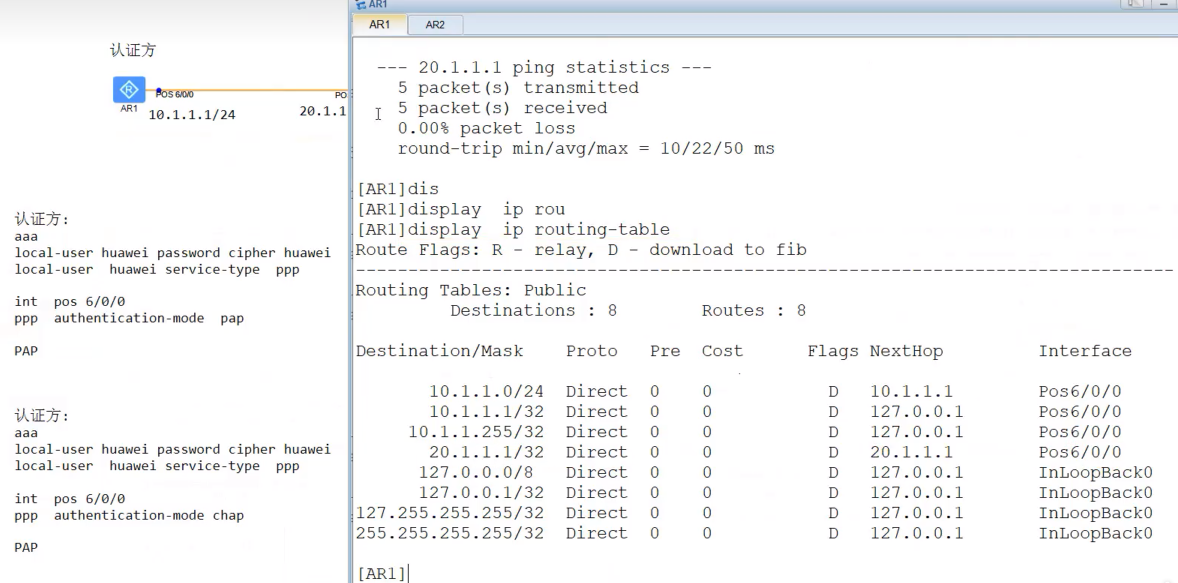
第一步的时候,会把人r1的ip 加入ip路由,
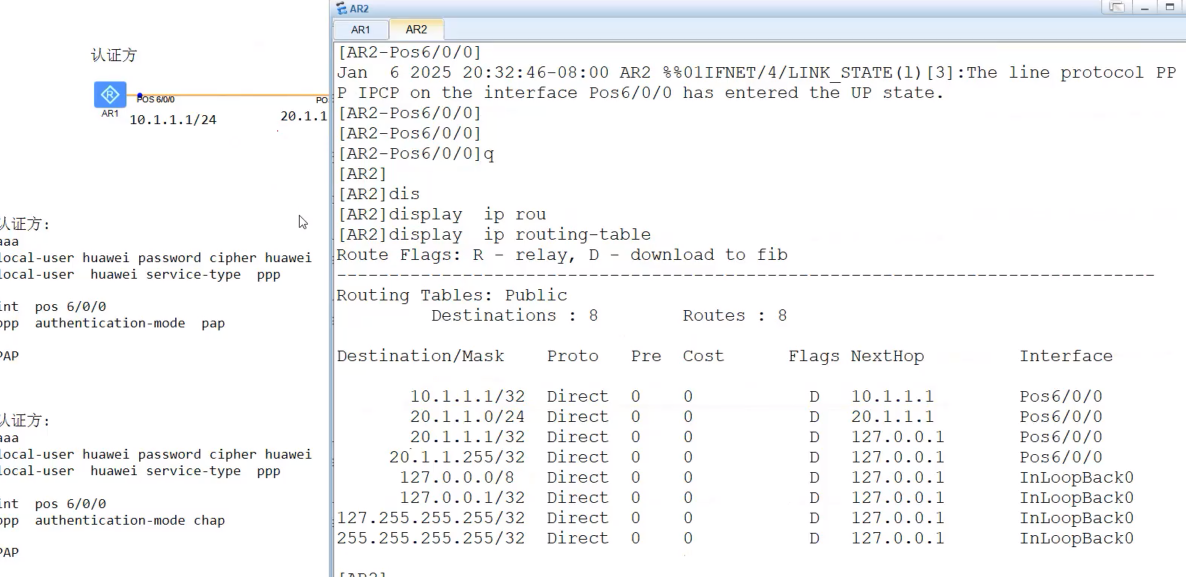
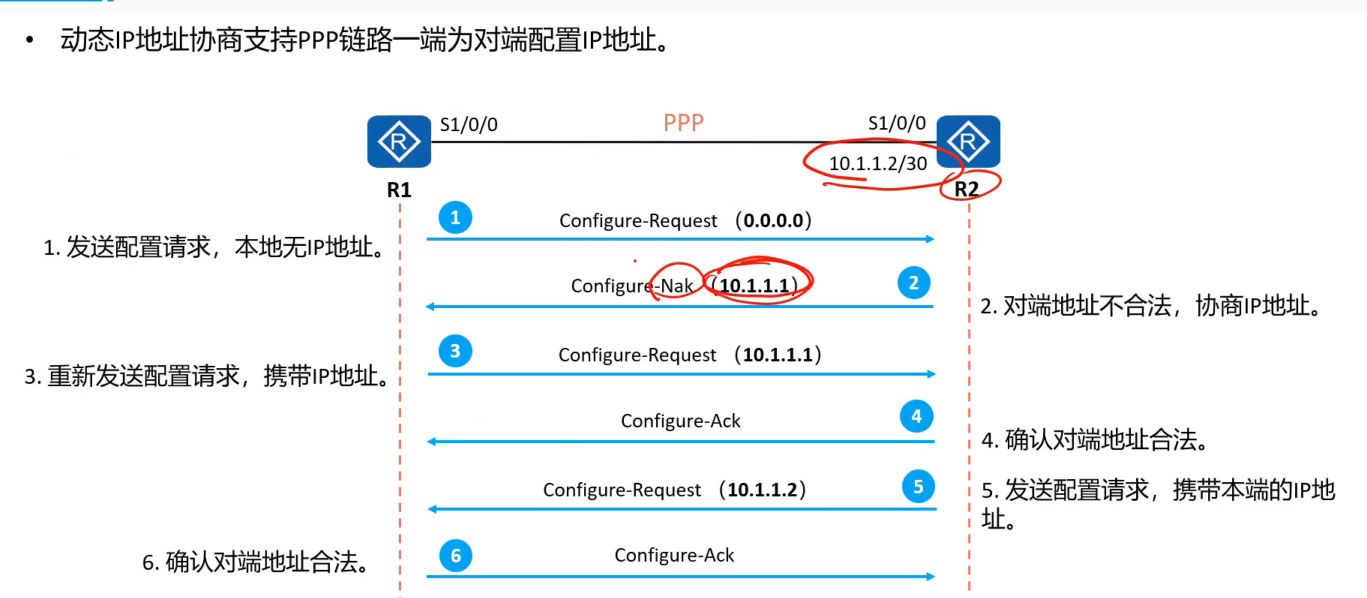
有动态协商,
1.创建地址池
第一步创建地址池 ip pool pppoe
[AR1]ip pool pppoe
Info: It's successful to create an IP address pool.
[AR1-ip-pool-pppoe]ne
[AR1-ip-pool-pppoe]netw
[AR1-ip-pool-pppoe]network 10.1.1.0 ma
[AR1-ip-pool-pppoe]network 10.1.1.0 mask 24
[AR1-ip-pool-pppoe]q
然后调用, pppoe 是创建时的名称
remote address 调用,
[AR1]int Pos 4/0/0
[AR1-Pos4/0/0]re
[AR1-Pos4/0/0]remote-
[AR1-Pos4/0/0]remote-a
[AR1-Pos4/0/0]remote-ad
[AR1-Pos4/0/0]remote ad
[AR1-Pos4/0/0]remote address po
[AR1-Pos4/0/0]remote address pool pppoe
接收ip
AR2>sys
Enter system view, return user view with Ctrl+Z.
[AR2]int p
[AR2]int Pos  4/0/0
[AR2-Pos4/0/0]ip ad
[AR2-Pos4/0/0]ip address ?
  IP_ADDR<X.X.X.X>  IP address
  ppp-negotiate     Negotiated IP address with the remote
  unnumbered        Share an address with another interface
[AR2-Pos4/0/0]ip address

[AR2-Pos4/0/0]ip address ppp-negotiate
Jul 28 2026 23:41:40-08:00 AR2 %%01IFNET/4/LINK_STATE(l)[0]:The line protocol PP
P IPCP on the interface Pos4/0/0 has entered the DOWN state.
[AR2-Pos4/0/0]di
Jul 28 2026 23:41:46-08:00 AR2 %%01IFNET/4/LINK_STATE(l)[1]:The line protocol PP
P IPCP on the interface Pos4/0/0 has entered the UP state.
[AR2-Pos4/0/0]d
[AR2-Pos4/0/0]
[AR2-Pos4/0/0]
[AR2-Pos4/0/0]dis ip in
[AR2-Pos4/0/0]dis ip int b
[AR2-Pos4/0/0]dis ip int br
[AR2-Pos4/0/0]dis ip int brief
*down: administratively down
^down: standby
(l): loopback
(s): spoofing
The number of interface that is UP in Physical is 2
The number of interface that is DOWN in Physical is 3
The number of interface that is UP in Protocol is 2
The number of interface that is DOWN in Protocol is 3

Interface                         IP Address/Mask      Physical   Protocol
GigabitEthernet0/0/0              unassigned           down       down
GigabitEthernet0/0/1              unassigned           down       down
GigabitEthernet0/0/2              unassigned           down       down
NULL0                             unassigned           up         up(s)
Pos4/0/0                          10.1.1.254/32        up         up
[AR2-Pos4/0/0]
测试看看能不能ping 通,
AR2-Pos4/0/0]ping 10.1.1.1
  PING 10.1.1.1: 56  data bytes, press CTRL_C to break
    Request time out
    Request time out
    Request time out
    Request time out
    Request time out

  --- 10.1.1.1 ping statistics ---
    5 packet(s) transmitted
    0 packet(s) received
    100.00% packet loss

[AR2-Pos4/0/0]
Jul 28 2026 23:44:43-08:00 AR2 %%01IFNET/4/LINK_STATE(l)[2]:The line protocol PP
P IPCP on the interface Pos4/0/0 has entered the DOWN state.
[AR2-Pos4/0/0]
Jul 28 2026 23:45:33-08:00 AR2 %%01IFNET/4/LINK_STATE(l)[3]:The line protocol PP
P IPCP on the interface Pos4/0/0 has entered the UP state.
[AR2-Pos4/0/0]ping 10.1.1.1
  PING 10.1.1.1: 56  data bytes, press CTRL_C to break
    Reply from 10.1.1.1: bytes=56 Sequence=1 ttl=255 time=60 ms
    Reply from 10.1.1.1: bytes=56 Sequence=2 ttl=255 time=20 ms
    Reply from 10.1.1.1: bytes=56 Sequence=3 ttl=255 time=20 ms
    Reply from 10.1.1.1: bytes=56 Sequence=4 ttl=255 time=20 ms
    Reply from 10.1.1.1: bytes=56 Sequence=5 ttl=255 time=20 ms

  --- 10.1.1.1 ping statistics ---
    5 packet(s) transmitted
    5 packet(s) received
    0.00% packet loss
    round-trip min/avg/max = 20/28/60 ms
没有修改来ip
AR1-Pos4/0/0]dis this
[V200R003C00]
#
interface Pos4/0/0
 link-protocol ppp
 ppp authentication-mode chap
 remote address pool pppoe
 ip address 10.0.12.1 255.255.255.0
#
return
[AR1-Pos4/0/0]undo ip address 10.0.12.1 24
Jul 28 2026 23:44:42-08:00 AR1 %%01IFNET/4/LINK_STATE(l)[0]:The line protocol PP
P IPCP on the interface Pos4/0/0 has entered the DOWN state.
[AR1-Pos4/0/0]address 10.1.1.1 24
              ^
Error: Unrecognized command found at '^' position.
[AR1-Pos4/0/0]ip address 10.1.1.1 24
[AR1-Pos4/0/0]
Jul 28 2026 23:45:32-08:00 AR1 %%01IFNET/4/LINK_STATE(l)[1]:The line protocol PP
P IPCP on the interface Pos4/0/0 has entered the UP state.
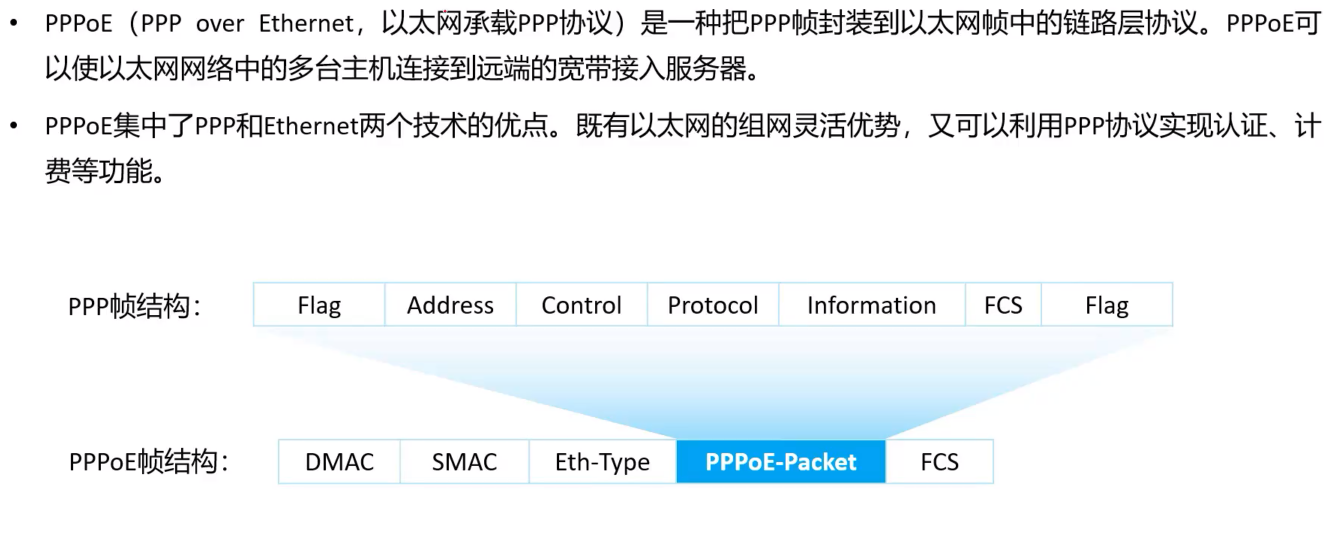
pppoe
拨号上网,利用ppp的特性,来运行,
给广域网,承载的,
实验拓扑
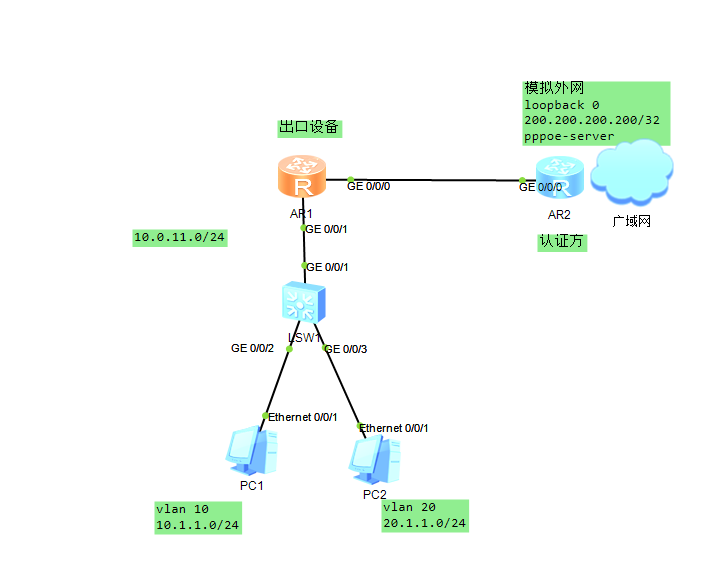
让内部网络,vlan 10 vlan 20 访问公网,
出口设备需配置nat 自动连接ip
配置账户,密码,连接类型
[Huawei]sysna
[Huawei]sysname ppoe-server
[ppoe-server]aaa
[ppoe-server-aaa]local-user huawei password cipher huawei
[ppoe-server-aaa]local-user huawei service-type ppp
分配ip
ppoe-server-aaa]q
[ppoe-server]ip p
[ppoe-server]ip pool
[ppoe-server]ip pool p
[ppoe-server]ip pool pppoe
Info: It's successful to create an IP address pool.
[ppoe-server-ip-pool-pppoe]ne
[ppoe-server-ip-pool-pppoe]netwo
[ppoe-server-ip-pool-pppoe]network 100.1.1.0 ma
[ppoe-server-ip-pool-pppoe]network 100.1.1.0 mask 24
[ppoe-server-ip-pool-pppoe]dis this
[V200R003C00]
#
ip pool pppoe
 network 100.1.1.0 mask 255.255.255.0
#
return
进入虚拟接口
配置认证方式ppp authentication-mode chap
ppoe-server]int Virtual-T	进入虚拟接口 然后是编号,
[ppoe-server]int Virtual-Template ?
  <0-1023>  Virtual template interface number
[ppoe-server]int Virtual-Template 0
Jul 29 2026 15:36:43-08:00 ppoe-server %%01IFPDT/4/IF_STATE(l)[0]:Interface Virt
ual-Template0 has turned into UP state.
[ppoe-server-Virtual-Template0]
[ppoe-server-Virtual-Template0]ip add 100.1.1.1 24
[ppoe-server-Virtual-Template0]ppp a
[ppoe-server-Virtual-Template0]ppp authentication-mode ?
  chap  Enable CHAP authentication
  pap   Enable PAP authentication
[ppoe-server-Virtual-Template0]ppp authentication-mode c
[ppoe-server-Virtual-Template0]ppp authentication-mode chap
[ppoe-server-Virtual-Template0]
然后调用刚才的设置地址池
[ppoe-server-Virtual-Template0]remote address pool pppoe
然后进入接口绑定虚拟接口,vt。pppoe-server bind virtual-template 0 ,

[ppoe-server-GigabitEthernet0/0/0]pp
[ppoe-server-GigabitEthernet0/0/0]pppoe-?
  pppoe-client  PPPoE Client Settings 客户模式
  pppoe-server  Specify PPPoE(PPP over Ethernet) server configuration    服务器模式
                information
[ppoe-server-GigabitEthernet0/0/0]pppoe-server
[ppoe-server-GigabitEthernet0/0/0]pppoe-server bind ?
virtual-template Virtual template
[ppoe-server-GigabitEthernet0/0/0]pppoe-server bind v
[ppoe-server-GigabitEthernet0/0/0]pppoe-server bind virtual-template 0
[ppoe-server-GigabitEthernet0/0/0]
配置客户端
然后再客户端配置
<Huawei>sys
Enter system view, return user view with Ctrl+Z.
[Huawei]sysn
[Huawei]sysname AR1
[AR1]sysname pppoe-cli
[AR1]sysname pppoe-client
[pppoe-client]int ?
  Bridge-if         Bridge-if interface
  Cellular          Cellular interface
  Dialer            Dialer interface
  Eth-Trunk         Ethernet-Trunk interface
  GigabitEthernet   GigabitEthernet interface
  Ima-group         ATM-IMA interface
  LoopBack          LoopBack interface
  MFR               MFR interface
  Mp-group          Mp-group interface
  NULL              NULL interface
  Tunnel            Tunnel interface
  Virtual-Ethernet  Virtual-Ethernet interface
  Virtual-Template  Virtual-Template interface
  Vlanif            Vlan interface
  Wlan-Ess          Wlan-Ess interface
[pppoe-client]int d
[pppoe-client]int Dialer 0
Jul 29 2026 15:48:23-08:00 pppoe-client %%01IFPDT/4/IF_STATE(l)[0]:Interface Dia
ler0 has turned into UP state.
[pppoe-client-Dialer0]dis this 默认就是使用ppp协议
[V200R003C00]
#
interface Dialer0
 link-protocol ppp
#
return
[pppoe-client-Dialer0]
账户密码,获取ip
[pppoe-client-Dialer0]ip ad
[pppoe-client-Dialer0]ip address ? ip 获取方式
  IP_ADDR<X.X.X.X>  IP address
  ppp-negotiate     Negotiated IP address with the remote
  unnumbered        Share an address with another interface
[pppoe-client-Dialer0]ip address pp
[pppoe-client-Dialer0]ip address ppp-negotiate      ppp 协议
[pppoe-client-Dialer0]ppp ch
[pppoe-client-Dialer0]ppp chap u
[pppoe-client-Dialer0]ppp chap user huawei   账户
[pppoe-client-Dialer0]ppp ch
[pppoe-client-Dialer0]ppp chap p
[pppoe-client-Dialer0]ppp chap password c
[pppoe-client-Dialer0]ppp chap password cipher huawei  密码
[pppoe-client-Dialer0]dis this
[V200R003C00]
#
interface Dialer0
 link-protocol ppp
 ppp chap user huawei
 ppp chap password cipher %$%$npa!Ro~0qD^Q_+B>4ngA,#E}%$%$
 ip address ppp-negotiate
#
return
配置绑定编号,需要绑定到接口,
/[pppoe-client-Dialer0]dialer user ?
STRING<1-32> The user name of remote
[pppoe-client-Dialer0]dialer user 1234
[pppoe-client-Dialer0]dia
[pppoe-client-Dialer0]dialer b
[pppoe-client-Dialer0]dialer bundle ?
INTEGER<1-255> Bundle number
[pppoe-client-Dialer0]dialer bundle
[pppoe-client-Dialer0]dis this
[V200R003C00]
#
interface Dialer0
 link-protocol ppp
 ppp chap user huawei
 ppp chap password cipher %$%$npa!Ro~0qD^Q_+B>4ngA,#E}%$%$
 ip address ppp-negotiate
 dialer user 1234
 dialer bundle 1
到接口配置绑定编号
[pppoe-client]int g0/0/0
[pppoe-client-GigabitEthernet0/0/0]pppo
[pppoe-client-GigabitEthernet0/0/0]pppoe-c
[pppoe-client-GigabitEthernet0/0/0]pppoe-client d
[pppoe-client-GigabitEthernet0/0/0]pppoe-client dial-bundle-number ?
  INTEGER<1-255>  Dialer bundle number
[pppoe-client-GigabitEthernet0/0/0]pppoe-client dial-bundle-number 1
[pppoe-client-GigabitEthernet0/0/0]
Jul 29 2026 16:00:14-08:00 pppoe-client %%01IFNET/4/LINK_STATE(l)[1]:The line pr
otocol PPP on the interface Dialer0:0 has entered the UP state.
然后查看一下
pppoe-client-GigabitEthernet0/0/0]q
[pppoe-client]dis ip in b
[pppoe-client]dis ip in brief
*down: administratively down
^down: standby
(l): loopback
(s): spoofing
The number of interface that is UP in Physical is 4
The number of interface that is DOWN in Physical is 1
The number of interface that is UP in Protocol is 2
The number of interface that is DOWN in Protocol is 3

Interface                         IP Address/Mask      Physical   Protocol
Dialer0                           100.1.1.254/32       up         up(s)
GigabitEthernet0/0/0              unassigned           up         down
GigabitEthernet0/0/1              unassigned           up         down
GigabitEthernet0/0/2              unassigned           down       down
NULL0                             unassigned           up
配置默认路由,缺省路由,再出接口
[pppoe-client]ip route-static 0.0.0.0 0 Dialer 0
配置本地环回口,模拟外网,
ppoe-server]int LoopBack 0
[ppoe-server-LoopBack0]ip add
[ppoe-server-LoopBack0]ip address 200.200.200.200 32
配置缺省路由
[pppoe-client]ip route-static 0.0.0.0 0 d
[pppoe-client]ip route-static 0.0.0.0 0 Dialer 0
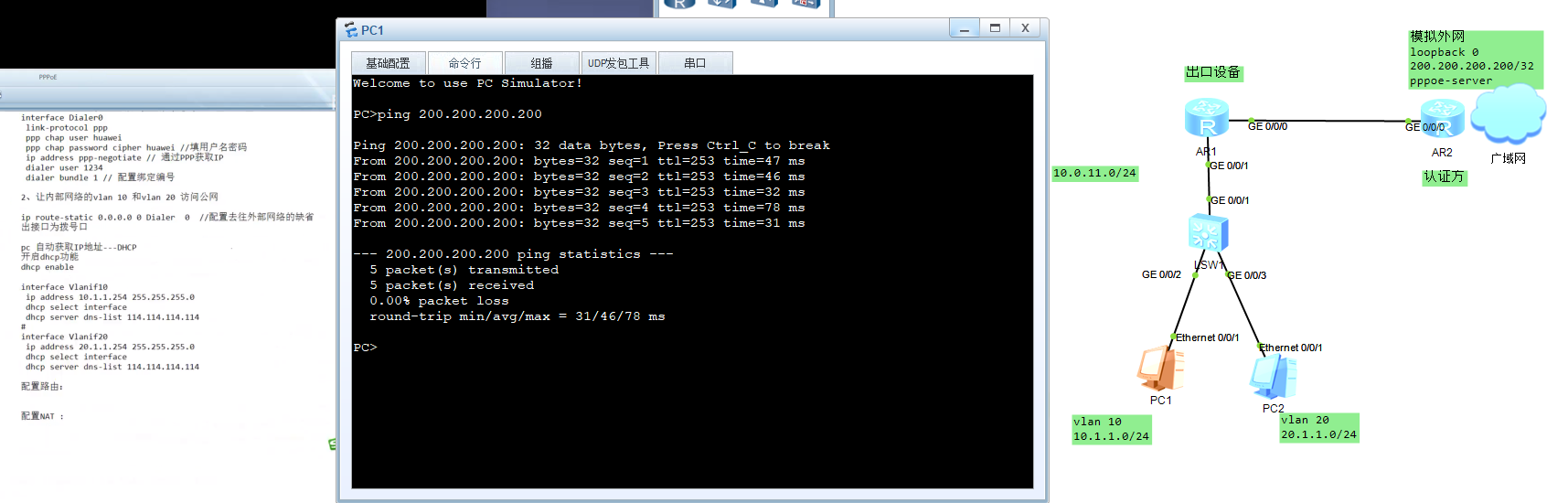
[pppoe-client]ping 200.200.200.200
  PING 200.200.200.200: 56  data bytes, press CTRL_C to break
    Reply from 200.200.200.200: bytes=56 Sequence=1 ttl=255 time=90 ms
    Reply from 200.200.200.200: bytes=56 Sequence=2 ttl=255 time=20 ms
    Reply from 200.200.200.200: bytes=56 Sequence=3 ttl=255 time=20 ms
    Reply from 200.200.200.200: bytes=56 Sequence=4 ttl=255 time=10 ms
    Reply from 200.200.200.200: bytes=56 Sequence=5 ttl=255 time=30 ms

  --- 200.200.200.200 ping statistics ---
    5 packet(s) transmitted
    5 packet(s) received
    0.00% packet loss
    round-trip min/avg/max = 10/34/90 ms
到交换机上配置 这里是内网
[sw1]vlan batch 10 20
Info: This operation may take a few seconds. Please wait for a moment...done.
[sw1]imd
Jul 29 2026 16:08:32-08:00 sw1 DS/4/DATASYNC_CFGCHANGE:OID 1.3.6.1.4.1.2011.5.25
.191.3.1 configurations have been changed. The current change number is 6, the c
hange loop count is 0, and the maximum number of records is 4095.
     ^
Error: Unrecognized command found at '^' position.
[sw1]undo inf
[sw1]undo info-center en
到接口去配置
sw1]int g0/0/2
[sw1-GigabitEthernet0/0/2]po
[sw1-GigabitEthernet0/0/2]port li
[sw1-GigabitEthernet0/0/2]port link-t
[sw1-GigabitEthernet0/0/2]port link-type a
[sw1-GigabitEthernet0/0/2]port link-type access
[sw1-GigabitEthernet0/0/2]po
[sw1-GigabitEthernet0/0/2]port de
[sw1-GigabitEthernet0/0/2]port default  v
[sw1-GigabitEthernet0/0/2]port default  vlan 10
[sw1-GigabitEthernet0/0/2]q
[sw1]int g0/0/3
[sw1-GigabitEthernet0/0/3]po
[sw1-GigabitEthernet0/0/3]port li
[sw1-GigabitEthernet0/0/3]port link-t
[sw1-GigabitEthernet0/0/3]port link-type a
[sw1-GigabitEthernet0/0/3]port link-type access
[sw1-GigabitEthernet0/0/3]po
[sw1-GigabitEthernet0/0/3]port de
[sw1-GigabitEthernet0/0/3]port default v
[sw1-GigabitEthernet0/0/3]port default vlan 20
[sw1-GigabitEthernet0/0/3]q
[sw1]
然后去配置网关
[sw1]interface v
[sw1]interface Vlanif 10
[sw1-Vlanif10]ip add 10.1.1.254 24
[sw1-Vlanif10]q
[sw1]int v
[sw1]int Vlanif 20
[sw1-Vlanif20]ip add 20.1.1.254 24
[sw1-Vlanif20]
配置ip
sw1]int Vlanif 1
[sw1-Vlanif1]ip add
[sw1-Vlanif1]ip address 10.0.11.2 24
[sw1-Vlanif1]
出口路由,的
接口配置IP
<pppoe-client>sys
Enter system view, return user view with Ctrl+Z.
[pppoe-client]int g0/0/1
[pppoe-client-GigabitEthernet0/0/1]ip add 10.0.11.1 24
Jul 29 2026 16:16:09-08:00 pppoe-client %%01IFNET/4/LINK_STATE(l)[0]:The line pr
otocol IP on the interface GigabitEthernet0/0/1 has entered the UP state.
[pppoe-client-GigabitEthernet0/0/1]
到网关交换机,配置dhcp 自动获取接口的ip 地址池
[sw1]dh
[sw1]dhcp en
[sw1]dhcp enable
Info: The operation may take a few seconds. Please wait for a moment.done.
[sw1]jint v
[sw1]jint vl
[sw1]in
[sw1]int v
[sw1]int Vlanif 10
[sw1-Vlanif10]sh
[sw1-Vlanif10]dh
[sw1-Vlanif10]dhcp se
[sw1-Vlanif10]dhcp select ?
  global     Local server
  interface  Interface server pool
  relay      DHCP relay

[sw1-Vlanif10]dhcp select i
[sw1-Vlanif10]dhcp select interface
[sw1-Vlanif10]dis this
#
interface Vlanif10
 ip address 10.1.1.254 255.255.255.0
 dhcp select interface
#
return
[sw1-Vlanif10]q
[sw1]int v
[sw1]int Vlanif 20
[sw1-Vlanif20]dh
[sw1-Vlanif20]dhcp se
[sw1-Vlanif20]dhcp select i
[sw1-Vlanif20]dhcp select interface
[sw1-Vlanif20]dis this
#
interface Vlanif20
 ip address 20.1.1.254 255.255.255.0
 dhcp select interface
#
return
[sw1-Vlanif20]
查看出口路由的路由表
[pppoe-client]dis ip routing-table
Route Flags: R - relay, D - download to fib
------------------------------------------------------------------------------
Routing Tables: Public
         Destinations : 10       Routes : 10

Destination/Mask    Proto   Pre  Cost      Flags NextHop         Interface

        0.0.0.0/0   Static  60   0           D   100.1.1.254     Dialer0
      10.0.11.0/24  Direct  0    0           D   10.0.11.1       GigabitEthernet
0/0/1
      10.0.11.1/32  Direct  0    0           D   127.0.0.1       GigabitEthernet
0/0/1
    10.0.11.255/32  Direct  0    0           D   127.0.0.1       GigabitEthernet
0/0/1
      100.1.1.1/32  Direct  0    0           D   100.1.1.1       Dialer0
    100.1.1.254/32  Direct  0    0           D   127.0.0.1       Dialer0
      127.0.0.0/8   Direct  0    0           D   127.0.0.1       InLoopBack0
      127.0.0.1/32  Direct  0    0           D   127.0.0.1       InLoopBack0
127.255.255.255/32  Direct  0    0           D   127.0.0.1       InLoopBack0
255.255.255.255/32  Direct  0    0           D   127.0.0.1       InLoopBack0

[pppoe-client]
[pppoe-client]ip route-static 10.1.1.0 24 10.0.11.2
[pppoe-client]ip route-static 20.1.1.0 24 10.0.11.2
[pppoe-client]dis ip routing-table
Route Flags: R - relay, D - download to fib
------------------------------------------------------------------------------
Routing Tables: Public
         Destinations : 12       Routes : 12

Destination/Mask    Proto   Pre  Cost      Flags NextHop         Interface

        0.0.0.0/0   Static  60   0           D   100.1.1.254     Dialer0
      10.0.11.0/24  Direct  0    0           D   10.0.11.1       GigabitEthernet
0/0/1
      10.0.11.1/32  Direct  0    0           D   127.0.0.1       GigabitEthernet
0/0/1
    10.0.11.255/32  Direct  0    0           D   127.0.0.1       GigabitEthernet
0/0/1
       10.1.1.0/24  Static  60   0          RD   10.0.11.2       GigabitEthernet
0/0/1
       20.1.1.0/24  Static  60   0          RD   10.0.11.2       GigabitEthernet
0/0/1
      100.1.1.1/32  Direct  0    0           D   100.1.1.1       Dialer0
    100.1.1.254/32  Direct  0    0           D   127.0.0.1       Dialer0
      127.0.0.0/8   Direct  0    0           D   127.0.0.1       InLoopBack0
      127.0.0.1/32  Direct  0    0           D   127.0.0.1       InLoopBack0
127.255.255.255/32  Direct  0    0           D   127.0.0.1       InLoopBack0
255.255.255.255/32  Direct  0    0           D   127.0.0.1       InLoopBack0
网关交换机查看ip路由表
[sw1]dis ip rou
[sw1]dis ip routing-table
Route Flags: R - relay, D - download to fib
------------------------------------------------------------------------------
Routing Tables: Public
         Destinations : 8        Routes : 8

Destination/Mask    Proto   Pre  Cost      Flags NextHop         Interface

      10.0.11.0/24  Direct  0    0           D   10.0.11.2       Vlanif1
      10.0.11.2/32  Direct  0    0           D   127.0.0.1       Vlanif1
       10.1.1.0/24  Direct  0    0           D   10.1.1.254      Vlanif10
     10.1.1.254/32  Direct  0    0           D   127.0.0.1       Vlanif10
       20.1.1.0/24  Direct  0    0           D   20.1.1.254      Vlanif20
     20.1.1.254/32  Direct  0    0           D   127.0.0.1       Vlanif20
      127.0.0.0/8   Direct  0    0           D   127.0.0.1       InLoopBack0
      127.0.0.1/32  Direct  0    0           D   127.0.0.1       InLoopBack0

[sw1]dis ip routing-table
Route Flags: R - relay, D - download to fib
------------------------------------------------------------------------------
Routing Tables: Public
         Destinations : 8        Routes : 8

Destination/Mask    Proto   Pre  Cost      Flags NextHop         Interface

      10.0.11.0/24  Direct  0    0           D   10.0.11.2       Vlanif1
      10.0.11.2/32  Direct  0    0           D   127.0.0.1       Vlanif1
       10.1.1.0/24  Direct  0    0           D   10.1.1.254      Vlanif10
     10.1.1.254/32  Direct  0    0           D   127.0.0.1       Vlanif10
       20.1.1.0/24  Direct  0    0           D   20.1.1.254      Vlanif20
     20.1.1.254/32  Direct  0    0           D   127.0.0.1       Vlanif20
      127.0.0.0/8   Direct  0    0           D   127.0.0.1       InLoopBack0
      127.0.0.1/32  Direct  0    0           D   127.0.0.1       InLoopBack0

[sw1]ip rou
[sw1]ip route-
[sw1]ip route-static 0.0.0.0 0 10.0.11.1  配置缺省路由,到出口设备,
[sw1]dis ip routing-table
Route Flags: R - relay, D - download to fib
------------------------------------------------------------------------------
Routing Tables: Public
         Destinations : 9        Routes : 9

Destination/Mask    Proto   Pre  Cost      Flags NextHop         Interface

        0.0.0.0/0   Static  60   0          RD   10.0.11.1       Vlanif1
      10.0.11.0/24  Direct  0    0           D   10.0.11.2       Vlanif1
      10.0.11.2/32  Direct  0    0           D   127.0.0.1       Vlanif1
       10.1.1.0/24  Direct  0    0           D   10.1.1.254      Vlanif10
     10.1.1.254/32  Direct  0    0           D   127.0.0.1       Vlanif10
       20.1.1.0/24  Direct  0    0           D   20.1.1.254      Vlanif20
     20.1.1.254/32  Direct  0    0           D   127.0.0.1       Vlanif20
      127.0.0.0/8   Direct  0    0           D   127.0.0.1       InLoopBack0
      127.0.0.1/32  Direct  0    0           D   127.0.0.1       InLoopBack0
配置nat
[pppoe-client]acl 2000
[pppoe-client-acl-basic-2000]rul
[pppoe-client-acl-basic-2000]rule p
[pppoe-client-acl-basic-2000]rule permit sou
[pppoe-client-acl-basic-2000]rule permit source ?
  IP_ADDR<X.X.X.X>  Address of source
  any               Any source
[pppoe-client-acl-basic-2000]rule permit source any
[pppoe-client-acl-basic-2000]dis this
[V200R003C00]
#
acl number 2000
 rule 5 permit
#
return
[pppoe-client-acl-basic-2000]q
[pppoe-client]int d
进入dialer 接口
[pppoe-client]int Dialer 0
[pppoe-client-Dialer0]dis this
[V200R003C00]
#
interface Dialer0
 link-protocol ppp
 ppp chap user huawei
 ppp chap password cipher %$%$npa!Ro~0qD^Q_+B>4ngA,#E}%$%$
 ip address ppp-negotiate
 dialer user 1234
 dialer bundle 1
#
return
[pppoe-client-Dialer0]

[pppoe-client-Dialer0]display ip interface brief   查看接口有咩有ip
*down: administratively down
^down: standby
(l): loopback
(s): spoofing
The number of interface that is UP in Physical is 4
The number of interface that is DOWN in Physical is 1
The number of interface that is UP in Protocol is 3
The number of interface that is DOWN in Protocol is 2

Interface                         IP Address/Mask      Physical   Protocol
Dialer0                           100.1.1.254/32       up         up(s)
GigabitEthernet0/0/0              unassigned           up         down
GigabitEthernet0/0/1              10.0.11.1/24         up         up
GigabitEthernet0/0/2              unassigned           down       down
NULL0                             unassigned           up         up(s)
[pppoe-client-Dialer0]
[pppoe-client-Dialer0]nat ou
[pppoe-client-Dialer0]nat outbound 2000
[pppoe-client-Dialer0]dis this
[V200R003C00]
#
interface Dialer0
link-protocol ppp
ppp chap user huawei
ppp chap password cipher %$%$npa!Ro~0qD^Q_+B>4ngA,#E}%$%$
ip address ppp-negotiate
dialer user 1234
dialer bundle 1
nat outbound 2000
#
1. PPP(Point-to-Point Protocol,点对点协议)
底层:运行在串行链路(老式电话线、串口、E1 专线)
本质:点对点链路层协议,用来在直连两点之间建立会话、认证、分配 IP。
特点:
链路天然是一对一,两端直连;
自带认证:PAP/CHAP;
协商 IP、DNS、压缩等参数;
传统场景:ADSL 早期串口拨号、GPRS/4G 模块拨号、串口 PPP。
⚠️ PPP不能直接跑在以太网,以太网是广播型多路访问网络,不是点对点链路。
2. PPPoE(PPP over Ethernet)
直译:把 PPP 封装在以太网帧里面传输
ppp 与pppoe
本文采用 CC BY-NC-SA 4.0 许可协议,转载请注明出处。
评论交流
欢迎留下你的想法