


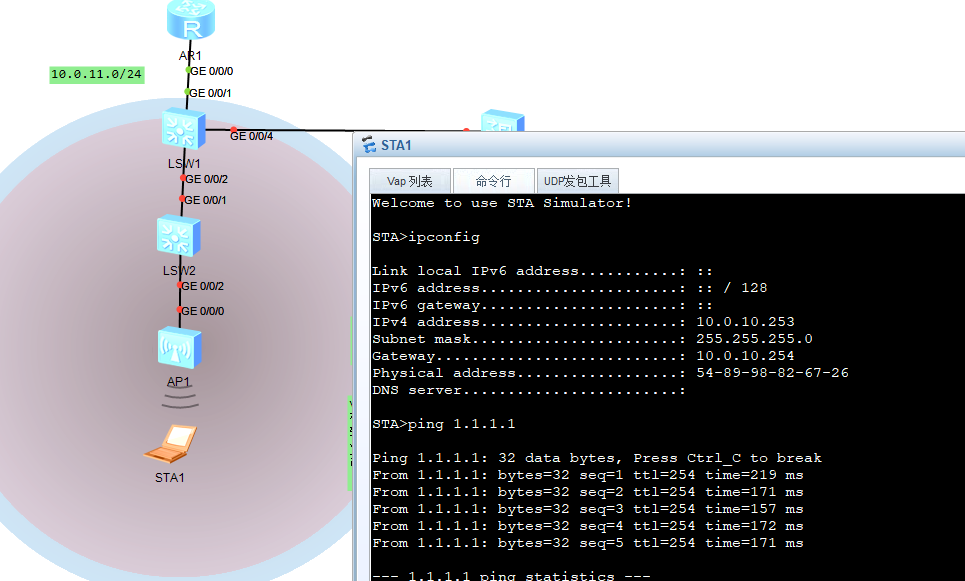
实验拓扑
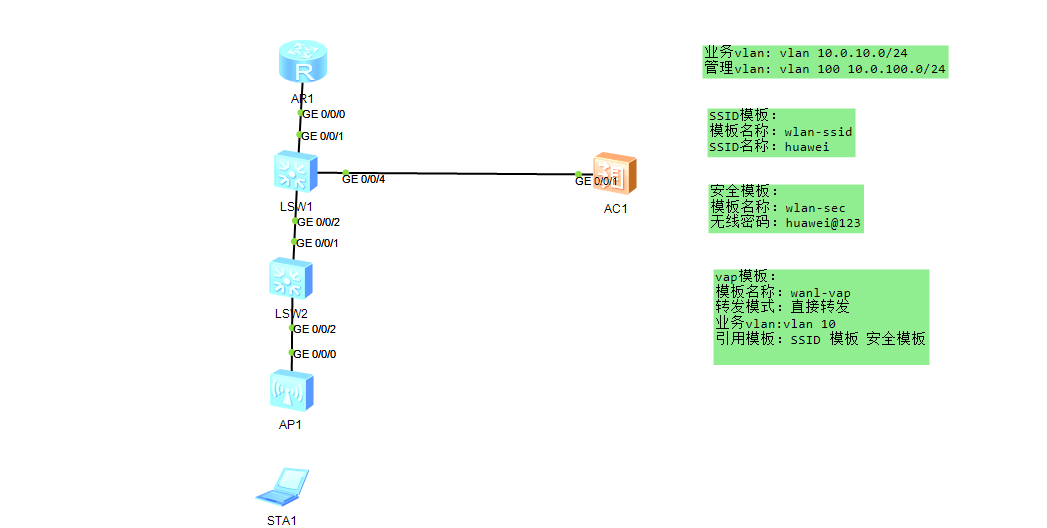
实验目的,
sta1 可以访问外网,自动获取ac的ip
ac 可以管理,ap 1 但无需配置访问外网,
sw1 sw2 ac 1 之间的接口配置成trunk 以后可以修改转发模式,sw1与ac 也可以是access 但是以后修改成隧道的话,必须修改成trunk
本地环回口模拟外网,
小知识,
[Huawei]sys AR1

[AR1]

[AR1]int lo0

[AR1-LoopBack0]ip add 1.1.1.1 32

[AR1-LoopBack0]q
第一步ap上线,
ap通过 dhcp 获取ip地址,ap的ip 由ac分配之前是在路由的接口配置dhcp
c创建vlan
转发模式是直接转发,不需要通过ac,ac只需要创建一个vlan
隧道转发需要通过ac
ac和ap之间需要隧道capwap
首先需要创建vlan
SW1
[Huawei]sysname
[Huawei]sysname SW1
[SW1]
Jul 28 2026 16:50:52-08:00 SW1 DS/4/DATASYNC_CFGCHANGE:OID 1.3.6.1.4.1.2011.5.25
.191.3.1 configurations have been changed. The current change number is 4, the c
hange loop count is 0, and the maximum number of records is 4095.
[SW1]
Jul 28 2026 16:51:29-08:00 SW1 %%01CPUUSAGE/4/CPU_USAGE_RESUME(l)[0]:CPU utiliza
tion recovered to the normal range.
Jul 28 2026 16:51:29-08:00 SW1 %%01VOSCPU/4/CPU_USAGE_RESUME(l)[1]:CPU utilizati
on recovered to the normal range.
[SW1]vlan b
[SW1]vlan batch 10
Info: This operation may take a few seconds. Please wait for a moment...done.
[SW1]
Jul 28 2026 16:51:42-08:00 SW1 DS/4/DATASYNC_CFGCHANGE:OID 1.3.6.1.4.1.2011.5.25
.191.3.1 configurations have been changed. The current change number is 5, the c
hange loop count is 0, and the maximum number of records is 4095.
[SW1]vlan batch 10 100
Info: This operation may take a few seconds. Please wait for a moment...done.
[SW1]
Jul 28 2026 16:51:52-08:00 SW1 DS/4/DATASYNC_CFGCHANGE:OID 1.3.6.1.4.1.2011.5.25
.191.3.1 configurations have been changed. The current change number is 6, the c
hange loop count is 0, and the maximum number of records is 4095.
[SW1]undo info
[SW1]undo info-center en
[SW1]undo info-center enable   关闭提醒,实验环境,
Info: Information center is disabled.
SW2
<Huawei>
Jul 28 2026 16:50:39-08:00 Huawei %%01VOSCPU/4/CPU_USAGE_HIGH(l)[0]:The CPU is o
verloaded(CpuUsage=88%, Threshold=80%), and the tasks with top three CPU occupan
cy are:
NonDopraTask  total      : 71%
ROUT  total      : 7%
    UserTaskName     CPU       Runtime(CPU Tick High/Tick Low)
    OSPF             0%                 0/       0
    OSPF6            0%                 0/       0
    ISIS             0%                 0/       0
    RIP              0%                 0/       0
    RIPNG            0%                 0/       0
    BGP              0%                 0/       0
    L3VPN            0%                 0/       0
    MCAST            0%                 0/       0
    RM               7%                 0/ 6bae6e5
MSYN  total      : 6%
<Huawei>sys
Enter system view, return user view with Ctrl+Z.
[Huawei]sysna
[Huawei]sysname SW2
[SW2]
Jul 28 2026 16:51:09-08:00 SW2 DS/4/DATASYNC_CFGCHANGE:OID 1.3.6.1.4.1.2011.5.25
.191.3.1 configurations have been changed. The current change number is 4, the c
hange loop count is 0, and the maximum number of records is 4095.
[SW2]
Jul 28 2026 16:51:40-08:00 SW2 %%01CPUUSAGE/4/CPU_USAGE_RESUME(l)[1]:CPU utiliza
tion recovered to the normal range.
Jul 28 2026 16:51:40-08:00 SW2 %%01VOSCPU/4/CPU_USAGE_RESUME(l)[2]:CPU utilizati
on recovered to the normal range.
[SW2]vlan ?
  INTEGER<1-4094>  VLAN ID
  batch            Batch process

[SW2]vlan b
[SW2]vlan batch 10 100
Info: This operation may take a few seconds. Please wait for a moment...done.
[SW2]undo
Jul 28 2026 16:52:30-08:00 SW2 DS/4/DATASYNC_CFGCHANGE:OID 1.3.6.1.4.1.2011.5.25
.191.3.1 configurations have been changed. The current change number is 5, the c
hange loop count is 0, and the maximum number of records is 4095.
          ^
Error:Incomplete command found at '^' position.
[SW2]undo inf
[SW2]undo info-center  ?
  channel             Set the name of information channel
  console             Setting of console configuration
  enable              Enable the information center
  filter-id           Specify the configuration of the ID filtering table
  local               Setting of logging configuraitons except loghost
  logbuffer           Setting of log buffer configuration
  loghost             Setting of logging host configuration
  monitor             Setting of monitor configuration
  rate-limit          Specify the rate at which the information center
                      processes information
  snmp                Setting of snmp configuration
  source              Informational source setting
  statistic-suppress  Suppression that the first occurrence of an event is
                      always logged immediately, but subsequence identical
                      messages are suppressed
  timestamp           Set the time stamp type of information
  trapbuffer          Setting of trap buffer configuration

[SW2]undo info-center  en
[SW2]undo info-center  enable
Info: Information center is disabled.
[SW2]
zai ac上操作
[AC1]int v
[AC1]int Vlanif 100
[AC1-Vlanif100]ip add
[AC1-Vlanif100]ip address 10.0.100.1 24
[AC1-Vlanif100]dh
[AC1-Vlanif100]dhcp ?
  relay   DHCP relay
  select  Select
  server  <Group> server command group
[AC1-Vlanif100]dhcp se
[AC1-Vlanif100]dhcp select in
[AC1-Vlanif100]dhcp select interface
Error: Please enable DHCP in the global view first.
[AC1-Vlanif100]dis this
#
interface Vlanif100
 ip address 10.0.100.1 255.255.255.0
#
return
[AC1-Vlanif100]dh
[AC1-Vlanif100]dhcp se
[AC1-Vlanif100]dhcp select in
[AC1-Vlanif100]dhcp select interface  报错是因为华为 AC / 交换机默认全局 DHCP 是关闭状态,直接在 Vlanif 接口配置 dhcp select interface 会报错。
Error: Please enable DHCP in the global view first.
[AC1-Vlanif100]q
[AC1]dhcp en
[AC1]dhcp enable
Info: The operation may take a few seconds. Please wait for a moment.done.
[AC1]int v
[AC1]int Vlanif 100
[AC1-Vlanif100]dhcp select interface
[AC1-Vlanif100]
[AC1-Vlanif100]dis this
#
interface Vlanif100
 ip address 10.0.100.1 255.255.255.0
 dhcp select interface
#
ap1上查看
查看
<Huawei>disp
<Huawei>display ip in
<Huawei>display ip interface b
<Huawei>display ip interface brief
*down: administratively down
^down: standby
(l): loopback
(s): spoofing
(E): E-Trunk down
The number of interface that is UP in Physical is 2
The number of interface that is DOWN in Physical is 0
The number of interface that is UP in Protocol is 2
The number of interface that is DOWN in Protocol is 0

Interface                         IP Address/Mask      Physical   Protocol
NULL0                             unassigned           up         up(s)
Vlanif1                           169.254.1.1/16       up         up

<Huawei>
它在vlan 1 请求,
ap和sw2 这线需要走两个vlan ,所以trunk 模式,
zai sw2上操作
[SW2]int g0/0/2
[SW2-GigabitEthernet0/0/2]por
[SW2-GigabitEthernet0/0/2]port li
[SW2-GigabitEthernet0/0/2]port link-t
[SW2-GigabitEthernet0/0/2]port link-type tr
[SW2-GigabitEthernet0/0/2]port link-type trunk
[SW2-GigabitEthernet0/0/2]po
[SW2-GigabitEthernet0/0/2]port ?
  add-tag        Add outer tag based on acl
  discard        Discard
  link-flap      Link flap
  link-type      Switch port link type
  mux-vlan       Multiplex vlan
  priority       Specify current port's priority
  trunk          Trunk port
  type           Type
  vlan-mapping   VLAN Mapping
  vlan-stacking  VLAN Stacking

[SW2-GigabitEthernet0/0/2]port t
[SW2-GigabitEthernet0/0/2]port trunk a
[SW2-GigabitEthernet0/0/2]port trunk allow-pass v
[SW2-GigabitEthernet0/0/2]port trunk allow-pass vlan 10 100
[SW2-GigabitEthernet0/0/2]dis this
#
interface GigabitEthernet0/0/2
 port link-type trunk
 port trunk allow-pass vlan 10 100
#
return
[SW2-GigabitEthernet0/0/2]
一个接口收到流量是属于那个vlan 是由什么决定??
SW2-GigabitEthernet0/0/2]dis port vlan
Port                    Link Type    PVID  Trunk VLAN List
-------------------------------------------------------------------------------
GigabitEthernet0/0/1    hybrid       1     -
GigabitEthernet0/0/2    trunk        1     1 10 100
GigabitEthernet0/0/3    hybrid       1     -
GigabitEthernet0/0/4    hybrid       1     -
GigabitEthernet0/0/5    hybrid       1     -
GigabitEthernet0/0/6    hybrid       1     -
GigabitEthernet0/0/7    hybrid       1     -
GigabitEthernet0/0/8    hybrid       1     -
GigabitEthernet0/0/9    hybrid       1     -
GigabitEthernet0/0/10   hybrid       1     -
GigabitEthernet0/0/11   hybrid       1     -
GigabitEthernet0/0/12   hybrid       1     -
GigabitEthernet0/0/13   hybrid       1     -
GigabitEthernet0/0/14   hybrid       1     -
GigabitEthernet0/0/15   hybrid       1     -
GigabitEthernet0/0/16   hybrid       1     -
GigabitEthernet0/0/17   hybrid       1     -
GigabitEthernet0/0/18   hybrid       1     -
GigabitEthernet0/0/19   hybrid       1     -
GigabitEthernet0/0/20   hybrid       1     -
GigabitEthernet0/0/21   hybrid       1     -
GigabitEthernet0/0/22   hybrid       1     -
GigabitEthernet0/0/23   hybrid       1     -
GigabitEthernet0/0/24   hybrid       1     -
s是由PID决定
[SW2-GigabitEthernet0/0/2]po
[SW2-GigabitEthernet0/0/2]port t
[SW2-GigabitEthernet0/0/2]port trunk p
[SW2-GigabitEthernet0/0/2]port trunk pvid v
[SW2-GigabitEthernet0/0/2]port trunk pvid vlan 100
[SW2-GigabitEthernet0/0/2]
[SW2-GigabitEthernet0/0/2]dis port vlan
Port                    Link Type    PVID  Trunk VLAN List
-------------------------------------------------------------------------------
GigabitEthernet0/0/1    hybrid       1     -
GigabitEthernet0/0/2    trunk        100   1 10 100
GigabitEthernet0/0/3    hybrid       1     -
GigabitEthernet0/0/4    hybrid       1     -
GigabitEthernet0/0/5    hybrid       1     -
GigabitEthernet0/0/6    hybrid       1     -
GigabitEthernet0/0/7    hybrid       1     -
GigabitEthernet0/0/8    hybrid       1     -
GigabitEthernet0/0/9    hybrid       1     -
GigabitEthernet0/0/10   hybrid       1     -
GigabitEthernet0/0/11   hybrid       1     -
GigabitEthernet0/0/12   hybrid       1     -
GigabitEthernet0/0/13   hybrid       1     -
SW1 和sw2 的接口,需要通过vlan 10 he vlan 100
SW2]int g0/0/1
[SW2-GigabitEthernet0/0/1]po
[SW2-GigabitEthernet0/0/1]port L
[SW2-GigabitEthernet0/0/1]port link-
[SW2-GigabitEthernet0/0/1]port link-t
[SW2-GigabitEthernet0/0/1]port link-type t
[SW2-GigabitEthernet0/0/1]port link-type trunk
[SW2-GigabitEthernet0/0/1]po
[SW2-GigabitEthernet0/0/1]port p
[SW2-GigabitEthernet0/0/1]port ?
  add-tag        Add outer tag based on acl
  discard        Discard
  link-flap      Link flap
  link-type      Switch port link type
  mux-vlan       Multiplex vlan
  priority       Specify current port's priority
  trunk          Trunk port
  type           Type
  vlan-mapping   VLAN Mapping
  vlan-stacking  VLAN Stacking

[SW2-GigabitEthernet0/0/1]port li
[SW2-GigabitEthernet0/0/1]port link-t
[SW2-GigabitEthernet0/0/1]port t
[SW2-GigabitEthernet0/0/1]port trunk a
[SW2-GigabitEthernet0/0/1]port trunk allow-pass v
[SW2-GigabitEthernet0/0/1]port trunk allow-pass vlan 10 100
SW1和ac 1接口还没配置
[SW1]in
[SW1]int g0/0/2
[SW1-GigabitEthernet0/0/2]po
[SW1-GigabitEthernet0/0/2]port l
[SW1-GigabitEthernet0/0/2]port link-t
[SW1-GigabitEthernet0/0/2]port link-type t
[SW1-GigabitEthernet0/0/2]port link-type trunk
[SW1-GigabitEthernet0/0/2]po
[SW1-GigabitEthernet0/0/2]port t
[SW1-GigabitEthernet0/0/2]port trunk a
[SW1-GigabitEthernet0/0/2]port trunk allow-pass vl
[SW1-GigabitEthernet0/0/2]port trunk allow-pass vlan 10 100
[SW1-GigabitEthernet0/0/2]q
这里的接口配置成trunk 因为, 可以修改转发模式,直接转发或者隧道转发,
[SW1-GigabitEthernet0/0/4]po
[SW1-GigabitEthernet0/0/4]port li
[SW1-GigabitEthernet0/0/4]port link-t
[SW1-GigabitEthernet0/0/4]port link-type t
[SW1-GigabitEthernet0/0/4]port link-type trunk
[SW1-GigabitEthernet0/0/4]po
[SW1-GigabitEthernet0/0/4]port t
[SW1-GigabitEthernet0/0/4]port trunk a
[SW1-GigabitEthernet0/0/4]port trunk allow-pass va
[SW1-GigabitEthernet0/0/4]port trunk allow-pass v
[SW1-GigabitEthernet0/0/4]port trunk allow-pass vlan 100
[SW1-GigabitEthernet0/0/4]
ac 接口也需要放行vlan 100
AC1]int g0/0/1
[AC1-GigabitEthernet0/0/1]po
[AC1-GigabitEthernet0/0/1]por
[AC1-GigabitEthernet0/0/1]por
[AC1-GigabitEthernet0/0/1]port li
[AC1-GigabitEthernet0/0/1]port link-type
[AC1-GigabitEthernet0/0/1]port link-type
[AC1-GigabitEthernet0/0/1]port link-type tr
[AC1-GigabitEthernet0/0/1]port link-type trunk
[AC1-GigabitEthernet0/0/1]po
[AC1-GigabitEthernet0/0/1]por
[AC1-GigabitEthernet0/0/1]port
[AC1-GigabitEthernet0/0/1]port-a
[AC1-GigabitEthernet0/0/1]port t
[AC1-GigabitEthernet0/0/1]port trunk a
[AC1-GigabitEthernet0/0/1]port trunk allow-pass vlan 100
[AC1-GigabitEthernet0/0/1]

  Please check whether system data has been changed, and save data in time

  Configuration console time out, please press any key to log on

<AC1>
<AC1>

  Please check whether system data has been changed, and save data in time

  Configuration console time out, please press any key to log on

<AC1>sys
Enter system view, return user view with Ctrl+Z.
[AC1]int g0/0/1
[AC1-GigabitEthernet0/0/1]dis this
#
interface GigabitEthernet0/0/1
 port link-type trunk
 port trunk allow-pass vlan 100
#
return
在ap 查看有没有获取到ip。第一次查看没有收到,就又到各个接口配置了一下,应该是第一次有某个接口没配置好,
<Huawei>display ip interface b
<Huawei>display ip interface brief
*down: administratively down
^down: standby
(l): loopback
(s): spoofing
(E): E-Trunk down
The number of interface that is UP in Physical is 2
The number of interface that is DOWN in Physical is 0
The number of interface that is UP in Protocol is 2
The number of interface that is DOWN in Protocol is 0

Interface                         IP Address/Mask      Physical   Protocol
NULL0                             unassigned           up         up(s)
Vlanif1                           169.254.1.1/16       up         up

<Huawei>

  Please check whether system data has been changed, and save data in time

  Configuration console time out, please press any key to log on

Info: You are advised to change the password to ensure security.
<Huawei>sys
Enter system view, return user view with Ctrl+Z.
[Huawei]dis ip in
[Huawei]dis ip int b
[Huawei]dis ip int brief
*down: administratively down
^down: standby
(l): loopback
(s): spoofing
(E): E-Trunk down
The number of interface that is UP in Physical is 2
The number of interface that is DOWN in Physical is 0
The number of interface that is UP in Protocol is 2
The number of interface that is DOWN in Protocol is 0

Interface                         IP Address/Mask      Physical   Protocol
NULL0                             unassigned           up         up(s)
Vlanif1                           169.254.1.1/16       up         up

[Huawei]

  Please check whether system data has been changed, and save data in time

  Configuration console time out, please press any key to log on

Info: You are advised to change the password to ensure security.
<Huawei>
<Huawei>sys
Enter system view, return user view with Ctrl+Z.
[Huawei]dis ip int b
[Huawei]dis ip int brief
*down: administratively down
^down: standby
(l): loopback
(s): spoofing
(E): E-Trunk down
The number of interface that is UP in Physical is 2
The number of interface that is DOWN in Physical is 0
The number of interface that is UP in Protocol is 2
The number of interface that is DOWN in Protocol is 0

Interface                         IP Address/Mask      Physical   Protocol
NULL0                             unassigned           up         up(s)
Vlanif1                           10.0.100.209/24      up         up
cawap隧道
AC1]capwap source interface Vlanif 100
[AC1-wlan-view]ap-group name huawei 创建ap组
[AC1-wlan-view]ap-id ? 创建的几种 方式
INTEGER<0-8191> AP ID
[AC1-wlan-view]ap-id 1 ?
ap-mac AP MAC address
ap-sn AP SN
ap-type AP type
type-id AP type ID
/
<cr> Please press ENTER to execute command
[AC1-wlan-view]ap-id 1 ap-m
[AC1-wlan-view]ap-id 1 ap-mac 00e0-fcd1-0610 ap-mac 认证
[AC1]capwap sou
[AC1]capwap source in
[AC1]capwap source interface vl
[AC1]capwap source interface Vlanif 100
[AC1]
]wlan
[AC1-wlan-view]ap-g
[AC1-wlan-view]ap-group name huawei
q
ap  id  1
[AC1-wlan-view]ap-group name huawei
Info: This operation may take a few seconds. Please wait for a moment.done.
[AC1-wlan-ap-group-huawei]q
[AC1-wlan-view]ap id 1 ?
                  ^
Error: Unrecognized command found at '^' position.
[AC1-wlan-view]ap
[AC1-wlan-view]ap
[AC1-wlan-view]ap-i
[AC1-wlan-view]ap-id ?
  INTEGER<0-8191>  AP ID
[AC1-wlan-view]ap-id 1 ?
  ap-mac   AP MAC address
  ap-sn    AP SN
  ap-type  AP type
  type-id  AP type ID
  <cr>     Please press ENTER to execute command
[AC1-wlan-view]ap-id 1
ac
dis int Vlanif 1
Vlanif1 current state : UP
Line protocol current state : UP
Last line protocol up time : 2026-07-28 13:51:17 UTC-05:13
Description:HUAWEI, AP Series, Vlanif1 Interface
Route Port,The Maximum Transmit Unit is 1500
Internet Address is allocated by DHCP, 10.0.100.209/24
IP Sending Frames' Format is PKTFMT_ETHNT_2, Hardware address is 00e0-fcd1-0610
Current system time: 2026-07-28 15:15:48-05:13
    Input bandwidth utilization  : --
    Output bandwidth utilization : --
[AC1-wlan-view]ap-id 1 ap-mac 00e0-fcd1-0610无线配置
[AC1]wlan
[AC1-wlan-view]ss
[AC1-wlan-view]ssid-profile na
[AC1-wlan-view]ssid-profile name wlan-ssid
[AC1-wlan-ssid-prof-wlan-ssid]
[AC1-wlan-ssid-prof-wlan-ssid]q
[AC1-wlan-view]sec
[AC1-wlan-view]security-profile name wln-sec ?
  <cr>  Please press ENTER to execute command
[AC1-wlan-view]security-profile name wln-sec
[AC1-wlan-sec-prof-wln-sec]sec
[AC1-wlan-sec-prof-wln-sec]security ?
  open      Open system
  wapi      WLAN authentication and privacy infrastructure
  wep       Wired equivalent privacy
  wpa       Wi-Fi protected access
  wpa-wpa2  Wi-Fi protected access version 1&2
  wpa2      Wi-Fi protected access version 2
[AC1-wlan-sec-prof-wln-sec]security wpa-
[AC1-wlan-sec-prof-wln-sec]security wpa-wpa2
AC1-wlan-sec-prof-wln-sec]security wpa-wpa2 ?
  dot1x  802.1x authentication
  psk    Pre-shared key
[AC1-wlan-sec-prof-wln-sec]security wpa-wpa2 ps
[AC1-wlan-sec-prof-wln-sec]security wpa-wpa2 psk ?
  hex          Hexadecimal
  pass-phrase  Passphrase
[AC1-wlan-sec-prof-wln-sec]security wpa-wpa2 psk pas
[AC1-wlan-sec-prof-wln-sec]security wpa-wpa2 psk pass-phrase huawei@123?
  STRING<8-108>  Key: contains 8-63 ASCII or 64 hex characters, or 48-108 cipher
-text characters.
[AC1-wlan-sec-prof-wln-sec]security wpa-wpa2 psk pass-phrase huawei@123 a
[AC1-wlan-sec-prof-wln-sec]security wpa-wpa2 psk pass-phrase huawei@123 an
[AC1-wlan-sec-prof-wln-sec]security wpa-wpa2 psk pass-phrase huawei@123 ae
[AC1-wlan-sec-prof-wln-sec]security wpa-wpa2 psk pass-phrase huawei@123 ?
  aes       Advanced encryption standard
  aes-tkip  AES-TKIP
  tkip      Temporal key integrity protocol
[AC1-wlan-sec-prof-wln-sec]security wpa-wpa2 psk pass-phrase huawei@123 aes

[AC1-wlan-sec-prof-wln-sec]q
[AC1-wlan-view]vap ?
  name  Name
[AC1-wlan-view]vap-
[AC1-wlan-view]vap-profile ?
  name  Name
[AC1-wlan-view]vap-profile name wlan-vap
[AC1-wlan-vap-prof-wlan-vap]forward-mode ?
direct-forward Direct forward 直接转发
softgre Softgre profile 软件加密
tunnel Tunnel 隧道转发
[AC1-wlan-vap-prof-wlan-vap]forward-mode
 name  Name
[AC1-wlan-view]vap-profile name wlan-vap
[AC1-wlan-vap-prof-wlan-vap]fo
[AC1-wlan-vap-prof-wlan-vap]forward-mode ?
  direct-forward  Direct forward
  softgre         Softgre profile
  tunnel          Tunnel
[AC1-wlan-vap-prof-wlan-vap]forward-mode d
[AC1-wlan-vap-prof-wlan-vap]forward-mode direct-forward
[AC1-wlan-vap-prof-wlan-vap]dis thi
[AC1-wlan-vap-prof-wlan-vap]dis this
#
return
[AC1-wlan-vap-prof-wlan-vap]
无线连接的vlan
[AC1-wlan-vap-prof-wlan-vap]service-v
[AC1-wlan-vap-prof-wlan-vap]service-vlan v
[AC1-wlan-vap-prof-wlan-vap]service-vlan vlan-id 10
Info: This operation may take a few seconds, please wait.done.
[AC1-wlan-vap-prof-wlan-vap]
,
上面创建的模板是套用
配置参数
ssid-profile name wlan-ssid
ssid huaweiya
security-profile name wlan-sec
security wap-wpa2 psk pass-phrase huawei@123 aes
[AC1]wlan
[AC1-wlan-view]sec
[AC1-wlan-view]security-profile na
[AC1-wlan-view]security-profile name wlan-sec
[AC1-wlan-sec-prof-wlan-sec]sec
[AC1-wlan-sec-prof-wlan-sec]security w
[AC1-wlan-sec-prof-wlan-sec]security wpa
[AC1-wlan-sec-prof-wlan-sec]security wpa-wpa2 ?
  dot1x  802.1x authentication
  psk    Pre-shared key
[AC1-wlan-sec-prof-wlan-sec]security wpa-wpa2 ps
[AC1-wlan-sec-prof-wlan-sec]security wpa-wpa2 psk ?
  hex          Hexadecimal
  pass-phrase  Passphrase
[AC1-wlan-sec-prof-wlan-sec]security wpa-wpa2 psk p
[AC1-wlan-sec-prof-wlan-sec]security wpa-wpa2 psk pass-phrase huawei@123 a
[AC1-wlan-sec-prof-wlan-sec]security wpa-wpa2 psk pass-phrase huawei@123 aes
[AC1-wlan-sec-prof-wlan-sec]q
[AC1-wlan-view]v
[AC1-wlan-view]va
[AC1-wlan-view]vap-profile na
[AC1-wlan-view]vap-profile name wl
[AC1-wlan-view]vap-profile name wlan-vap
[AC1-wlan-vap-prof-wlan-vap]se
[AC1-wlan-vap-prof-wlan-vap]security-profile wlan-sec
Info: This operation may take a few seconds, please wait.done.
[AC1-wlan-vap-prof-wlan-vap]
vap-profile name wlan-vap模板
[AC1-wlan-vap-prof-wlan-vap]dis this
#
service-vlan vlan-id 10
ssid-profile wlan-ssid
security-profile wlan-sec
ap组调用模板,
[AC1-wlan-view]ap-group name huawei
[AC1-wlan-ap-group-huawei]dis this
#
return
[AC1-wlan-ap-group-huawei]vap
[AC1-wlan-ap-group-huawei]vap-profile w
[AC1-wlan-ap-group-huawei]vap-profile wlan-vap ?
  wlan  WLAN
[AC1-wlan-ap-group-huawei]vap-profile wlan-vap wlan 1 r
[AC1-wlan-ap-group-huawei]vap-profile wlan-vap wlan 1 radio al
[AC1-wlan-ap-group-huawei]vap-profile wlan-vap wlan 1 radio all
Info: This operation may take a few seconds, please wait...done.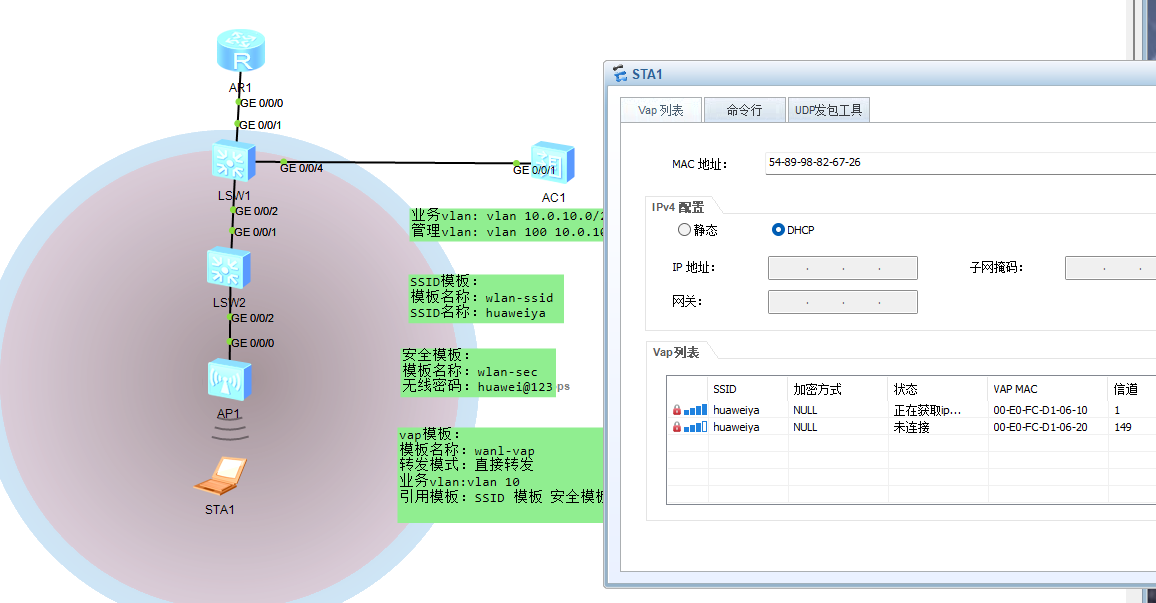
还需要到SW1 开启网关,dhcp
[SW1]dhcp en
[SW1]dhcp enable
Info: The operation may take a few seconds. Please wait for a moment.done.
[SW1]int vl
[SW1]int Vlanif 10
[SW1-Vlanif10]ip add 10.0.10.254 24
[SW1-Vlanif10]dhi
[SW1-Vlanif10]dh
[SW1-Vlanif10]dhcp se
[SW1-Vlanif10]dhcp select i
[SW1-Vlanif10]dhcp select interface
[SW1-Vlanif10]dis this
#
interface Vlanif10
 ip address 10.0.10.254 255.255.255.0
 dhcp select interface
#
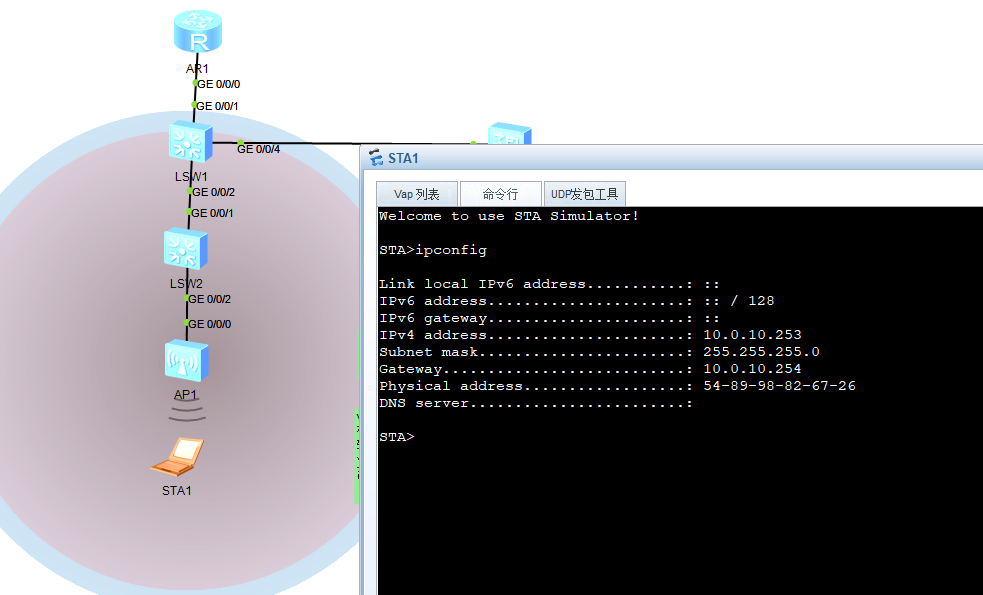
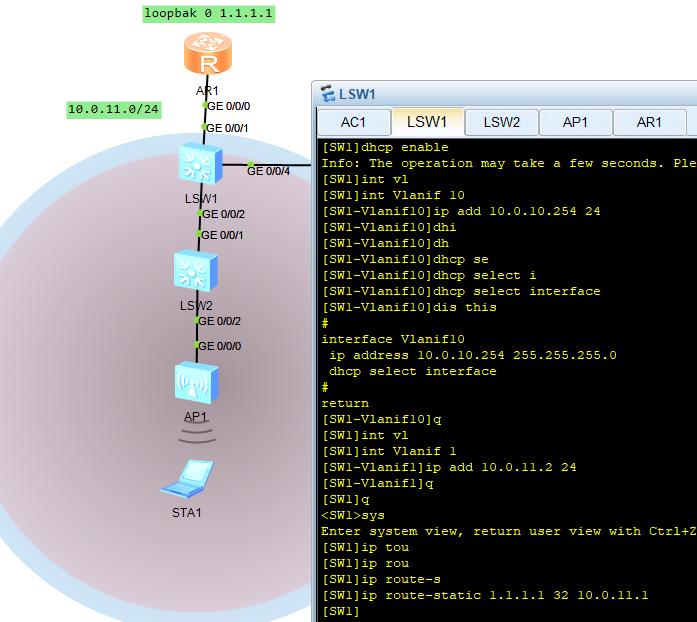
AR1 配置环回口模拟外网
[Huawei]sys AR1
[AR1]
[AR1]int lo0
[AR1-LoopBack0]ip add 1.1.1.1 32
[AR1-LoopBack0]q
[AR1]int g0/0/0
[AR1-GigabitEthernet0/0/0]ip add 10.0.11.1 24
Jul 28 2026 19:02:03-08:00 AR1 %%01IFNET/4/LINK_STATE(l)[0]:The line protocol IP
 on the interface GigabitEthernet0/0/0 has entered the UP state.
[AR1-GigabitEthernet0/0/0]
[AR1-GigabitEthernet0/0/0]
 on the interface GigabitEthernet0/0/0 has entered the UP state.
[AR1-GigabitEthernet0/0/0]
[AR1-GigabitEthernet0/0/0]q
[AR1]ip tou
[AR1]ip rou
[AR1]ip route-
[AR1]ip route-static 10.0.10.0 24 10.0.11.2
配置一个静态路由,直通环回口,模拟外网
[SW1-Vlanif10]q
[SW1]int vl
[SW1]int Vlanif 1
[SW1-Vlanif1]ip add 10.0.11.2 24
[SW1-Vlanif1]q
[SW1]q
<SW1>sys
Enter system view, return user view with Ctrl+Z.
[SW1]ip tou
[SW1]ip rou
[SW1]ip route-s
[SW1]ip route-static 1.1.1.1 32 10.0.11.1
ping 通了,
华为无线技术 AC AP
本文采用 CC BY-NC-SA 4.0 许可协议,转载请注明出处。
评论交流
欢迎留下你的想法