


项目背景
硬件:LGA‑775 双核老旧主机、8G 内存,运行 Docker、K8s、Harbor 私有镜像仓库 未来升级未16G内存
操作目标:将 Harbor 持久化数据迁移至 /opt/mirror 磁盘目录
故障 1:容器启动报错,证书挂载失败
报错日志
plaintext
OCI runtime create failed: runc create failed: unable to start container process: error during container init: error mounting "/home/harbor/secret/registry/root.crt" to rootfs at "/etc/registry/root.crt": create mountpoint for /etc/registry/root.crt mount: cannot create subdirectories in ".../merged/etc/registry/root.crt": not a directory
Are you trying to mount a directory onto a file (or vice‑versa)?
故障根因
迁移的时候rsync同步失误,证书文件root.crt被误生成成文件夹
Docker 硬性规则:文件只能够挂载至文件、文件夹只能够挂载至文件夹,二者类型冲突,容器初始化直接失败。
处理步骤
关闭 Harbor 全部容器
bash
docker compose down
删除错误生成的证书文件夹
bash
sudo rm -rf /home/harbor/secret/registry/root.crt
重新生成内网自签证书(CN 填写服务器内网 IP,有效期 10 年)
bash
cd /home/harbor/secret/registry
sudo openssl req -x509 -nodes -days 3650 -newkey rsa:2048 -keyout root.key -out root.crt -subj "/CN=192.168.x.x"
校验文件,确认
root.crt、root.key为普通文件
bash
ls -l
故障 2:执行 sudo ./install.sh 提示 command not found
报错原因
目录混淆,安装目录和数据目录相互独立
/home/harbor:纯数据目录,存放数据库、redis、镜像、secret 证书/home/shitou/harbor:真正的 Harbor 安装目录,内置install.sh、harbor.yml、docker‑compose 配置文件
解决命令
bash
# 切换至正确安装目录
cd /home/shitou/harbor
# 重载配置脚本
sudo ./install.sh

 sudo ./install.sh

[Step 0]: checking if docker is installed ...

Note: docker version: 28.3.3

[Step 1]: checking docker-compose is installed ...

Note: Docker Compose version v2.39.1

[Step 2]: loading Harbor images ...
Loaded image: goharbor/nginx-photon:v2.13.1
Loaded image: goharbor/registry-photon:v2.13.1
2a74242fce76: Loading layer  9.154MB/9.154MB
7051c425c9f6: Loading layer  4.096kB/4.096kB
09bf6325cada: Loading layer  3.072kB/3.072kB
62bfb82cbb95: Loading layer  152.9MB/152.9MB
88175ab477ee: Loading layer  15.55MB/15.55MB
def8aedceb03: Loading layer  169.3MB/169.3MB
Loaded image: goharbor/trivy-adapter-photon:v2.13.1
Loaded image: goharbor/harbor-db:v2.13.1
Loaded image: goharbor/harbor-registryctl:v2.13.1
484fc2e66f7a: Loading layer  11.61MB/11.61MB
9728d2f8d35e: Loading layer  38.17MB/38.17MB
042d109f1f08: Loading layer  4.608kB/4.608kB
55e101fed5da: Loading layer  38.96MB/38.96MB
Loaded image: goharbor/harbor-exporter:v2.13.1
Loaded image: goharbor/redis-photon:v2.13.1
Loaded image: goharbor/harbor-jobservice:v2.13.1
71e138085c44: Loading layer  102.7MB/102.7MB
07ba19f8efca: Loading layer  51.82MB/51.82MB
3d2807193888: Loading layer  14.23MB/14.23MB
18cbe47ee1d1: Loading layer  66.05kB/66.05kB
ba9be5eb6017: Loading layer   2.56kB/2.56kB
845ba7ceb8a2: Loading layer  1.536kB/1.536kB
ec2ade74a904: Loading layer  12.29kB/12.29kB
a8f7d0746d1c: Loading layer  3.413MB/3.413MB
70521830bab0: Loading layer  561.7kB/561.7kB
Loaded image: goharbor/prepare:v2.13.1
Loaded image: goharbor/harbor-portal:v2.13.1
Loaded image: goharbor/harbor-core:v2.13.1
Loaded image: goharbor/harbor-log:v2.13.1


[Step 3]: preparing environment ...

[Step 4]: preparing harbor configs ...
prepare base dir is set to /home/shitou/harbor
Clearing the configuration file: /config/log/rsyslog_docker.conf
Clearing the configuration file: /config/log/logrotate.conf
Clearing the configuration file: /config/db/env
Clearing the configuration file: /config/portal/nginx.conf
Clearing the configuration file: /config/core/app.conf
Clearing the configuration file: /config/core/env
Clearing the configuration file: /config/nginx/nginx.conf
Clearing the configuration file: /config/registryctl/config.yml
Clearing the configuration file: /config/registryctl/env
Clearing the configuration file: /config/registry/passwd
Clearing the configuration file: /config/registry/root.crt
Clearing the configuration file: /config/registry/config.yml
Clearing the configuration file: /config/jobservice/config.yml
Clearing the configuration file: /config/jobservice/env
Generated configuration file: /config/portal/nginx.conf
Generated configuration file: /config/log/logrotate.conf
Generated configuration file: /config/log/rsyslog_docker.conf
Generated configuration file: /config/nginx/nginx.conf
Generated configuration file: /config/core/env
Generated configuration file: /config/core/app.conf
Generated configuration file: /config/registry/config.yml
Generated configuration file: /config/registryctl/env
Generated configuration file: /config/registryctl/config.yml
Generated configuration file: /config/db/env
Generated configuration file: /config/jobservice/env
Generated configuration file: /config/jobservice/config.yml
copy /data/secret/tls/harbor_internal_ca.crt to shared trust ca dir as name harbor_internal_ca.crt ...
ca file /hostfs/data/secret/tls/harbor_internal_ca.crt is not exist
copy  to shared trust ca dir as name storage_ca_bundle.crt ...
copy None to shared trust ca dir as name redis_tls_ca.crt ...
Generated and saved secret to file: /data/secret/keys/secretkey
Successfully called func: create_root_cert
Generated configuration file: /compose_location/docker-compose.yml
Clean up the input dir


Note: stopping existing Harbor instance ...


[Step 5]: starting Harbor ...
[+] Running 10/10
 ✔ Network harbor_harbor        Created                                    0.1s
 ✔ Container harbor-log         Started                                    2.0s
 ✔ Container registryctl        Started                                    2.6s
 ✔ Container harbor-db          Started                                    2.9s
 ✔ Container registry           Started                                    2.8s
 ✔ Container harbor-portal      Started                                    3.0s
 ✔ Container redis              Started                                    2.7s
 ✔ Container harbor-core        Started                                    3.1s
 ✔ Container harbor-jobservice  Started                                    4.1s
 ✔ Container nginx              Started                                    4.6s
✔ ----Harbor has been installed and started successfully.----
shitou@shitou:~/harbor$
故障 3:老旧主机 Docker overlay2 文件系统缓存错乱
现象
证书文件修复完毕之后依旧挂载异常
诱因
775 架构双核 CPU 性能偏弱,大批量镜像迁移、IO 读写容易造成 Docker 存储缓存异常
修复方案
每次重载配置之前重启 Docker 服务,清空挂载缓存
bash
sudo systemctl stop docker
sudo systemctl stop docker.socket
sudo systemctl start docker
完整标准操作流程(迁移‑证书修复‑启动)
bash
# 1.关停所有抢占磁盘IO的后台服务
sudo systemctl stop tunasync-worker
sudo systemctl stop tunasync-manager
sudo systemctl stop kubelet
sudo systemctl stop containerd
sudo systemctl stop docker
sudo systemctl stop docker.socket
sudo systemctl stop netdata
sudo systemctl stop cron
sudo systemctl stop nginx

# 2.检查目录无进程占用
lsof +D /opt/mirror

# 3.处理证书故障
cd /home/harbor/secret/registry
sudo rm -rf root.crt
sudo openssl req -x509 -nodes -days 3650 -newkey rsa:2048 -keyout root.key -out root.crt -subj "/CN=你的内网IP"

# 4.重启Docker清理缓存
sudo systemctl restart docker

# 5.进入安装目录重载配置
cd /home/shitou/harbor
sudo ./install.sh

# 6.启动私有仓库
docker compose up -d

# 7.查看容器运行状态
docker compose ps
迁移避坑总结
路径一定要分清:安装目录负责配置脚本;数据目录只存放持久化资源,二者不要混淆
rsync 同步文件的时候警惕文件‑目录结构错乱,证书这类独立文件禁止递归覆盖
HTTPS 证书存放路径不变,harbor.yml 配置就无需修改,换新证书只需要重新执行
install.sh刷新挂载低性能双核主机迁移期间关闭 K8s、文件同步、监控等后台服务,防止 CPU 满载、IO 冲突引发各类 Docker 文件系统异常
完美启动
shitou@shitou:~/harbor$ sudo docker compose up -d
[+] Running 9/9
 ✔ Container harbor-log         Running                                    0.0s
 ✔ Container harbor-db          Running                                    0.0s
 ✔ Container harbor-portal      Running                                    0.0s
 ✔ Container redis              Running                                    0.0s
 ✔ Container registryctl        Running                                    0.0s
 ✔ Container registry           Running                                    0.0s
 ✔ Container harbor-core        Running                                    0.0s
 ✔ Container nginx              Running                                    0.0s
 ✔ Container harbor-jobservice  Running                                    0.0s
shitou@shitou:~/harbor$ docker compose ps
open /home/shitou/harbor/common/config/registryctl/env: permission denied
shitou@shitou:~/harbor$ sudo docker compose ps
NAME                IMAGE                                 COMMAND                  SERVICE       CREATED         STATUS                   PORTS
harbor-core         goharbor/harbor-core:v2.13.1          "/harbor/entrypoint.…"   core          3 minutes ago   Up 2 minutes (healthy)
harbor-db           goharbor/harbor-db:v2.13.1            "/docker-entrypoint.…"   postgresql    3 minutes ago   Up 3 minutes (healthy)
harbor-jobservice   goharbor/harbor-jobservice:v2.13.1    "/harbor/entrypoint.…"   jobservice    3 minutes ago   Up 2 minutes (healthy)
harbor-log          goharbor/harbor-log:v2.13.1           "/bin/sh -c /usr/loc…"   log           3 minutes ago   Up 3 minutes (healthy)   127.0.0.1:1514->10514/tcp
harbor-portal       goharbor/harbor-portal:v2.13.1        "nginx -g 'daemon of…"   portal        3 minutes ago   Up 3 minutes (healthy)
nginx               goharbor/nginx-photon:v2.13.1         "nginx -g 'daemon of…"   proxy         3 minutes ago   Up 3 minutes (healthy)   0.0.0.0:80->8080/tcp, [::]:80->8080/tcp, 0.0.0.0:443->8443/tcp, [::]:443->8443/tcp
redis               goharbor/redis-photon:v2.13.1         "redis-server /etc/r…"   redis         3 minutes ago   Up 3 minutes (healthy)
registry            goharbor/registry-photon:v2.13.1      "/home/harbor/entryp…"   registry      3 minutes ago   Up 3 minutes (healthy)
registryctl         goharbor/harbor-registryctl:v2.13.1   "/home/harbor/start.…"   registryctl   3 minutes ago   Up 3 minutes (healthy)
shitou@shitou:~/harbor$
本次改动清单
修改
harbor.yml对外服务端口,规避宿主机 80/443 端口冲突yaml
http:
  port: 8080
https:
  port: 8443
HTTPS 证书沿用之前生成的自签证书,证书 CN 绑定内网 IP,端口改动不需要重新制作证书
停止容器 → 重启 Docker 清理 overlay 缓存 → 执行
install.sh重载全新端口配置 → 启动 Harbor区分两个访问入口,解决
SSL_ERROR_RX_RECORD_TOO_LONGSSL 报错
分步操作命令日志
bash
# 1.进入Harbor安装目录
cd /home/shitou/harbor

# 2.关闭正在运行的旧容器
docker compose down

# 3.重启Docker,清除老旧挂载缓存(老旧双核主机必执行)
sudo systemctl restart docker

# 4.重载更新后的端口配置
sudo ./install.sh

# 5.后台启动整套仓库服务
docker compose up -d

# 6.查验端口映射是否生效
docker compose ps
成功之后 nginx‑proxy 端口映射关系:
宿主机
8080→ 容器内部 8080(HTTP 明文端口)宿主机
8443→ 容器内部 8443(HTTPS 加密、证书端口)
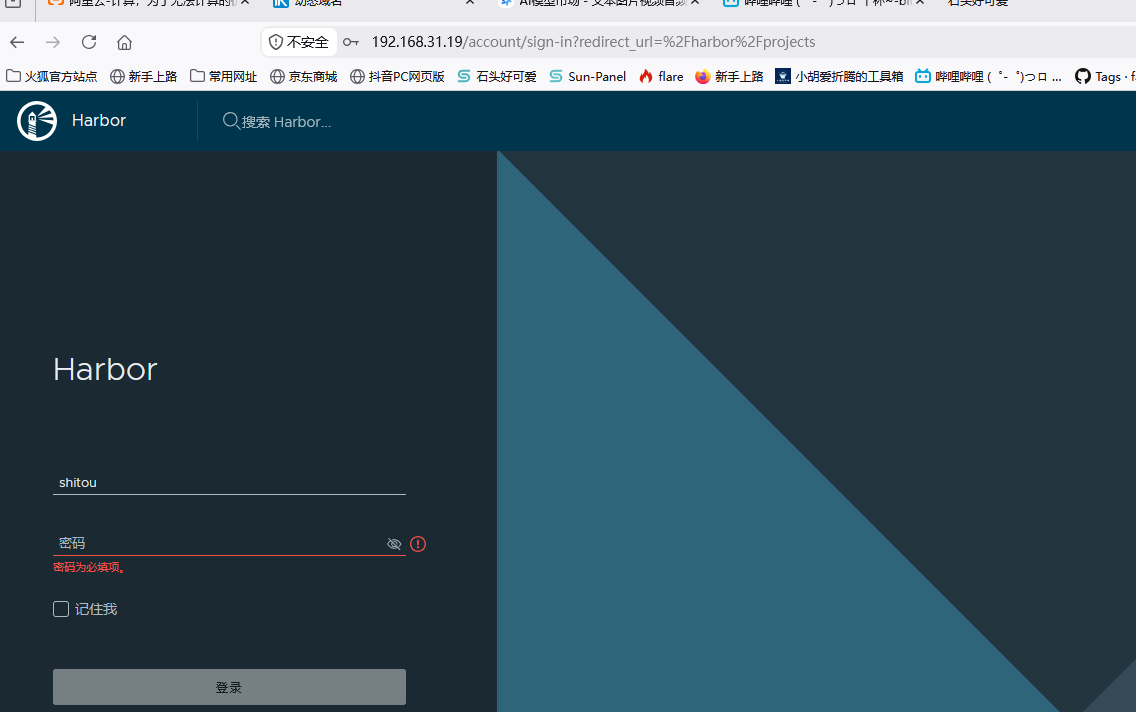
、浏览器访问规范(之前报错根源)
http 明文地址:
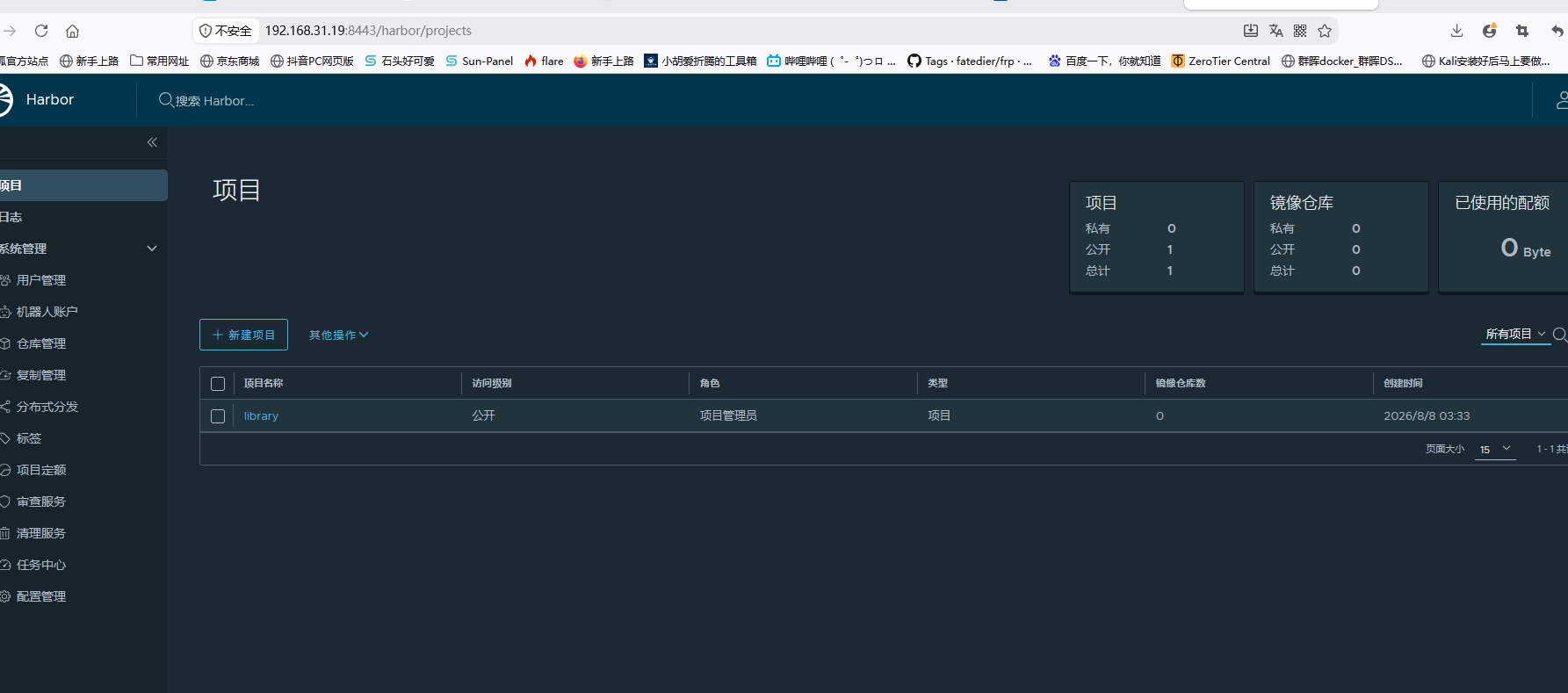
http://192.168.31.19:8080,会自动重定向至 https管理页面登录地址(正确):
https://192.168.31.19:8443
❌ 禁止使用
https://ip:8080,https 加密协议访问明文端口,直接抛出 SSL 数据包超长报错
四、Docker 客户端适配配置
修改 docker 信任非安全仓库地址,带上 8443 端口
bash
sudo nano /etc/docker/daemon.json
json
{
  "insecure-registries":["192.168.31.19:8443"]
}
重启 Docker 加载配置
bash
sudo systemctl restart docker
登录私有镜像仓库
bash
docker login 192.168.31.19:8443 -u admin -p Harbor12345
五、本次新增故障点,写入博客避坑总结
宿主机原有服务占用 80、443 端口,因此将 Harbor 对外端口改为 8080 (HTTP)、8443 (HTTPS)
端口只是宿主机映射出口,自签证书绑定 IP,更换端口无需重新生成证书
报错
SSL_ERROR_RX_RECORD_TOO_LONG代表 HTTPS 访问了 HTTP 明文端口,两个端口协议不可混用所有 docker‑login、镜像推拉、客户端配置,地址必须携带 HTTPS 端口
:8443
Harbor 迁移数据盘完整故障排查日志
本文采用 CC BY-NC-SA 4.0 许可协议,转载请注明出处。
评论交流
欢迎留下你的想法