


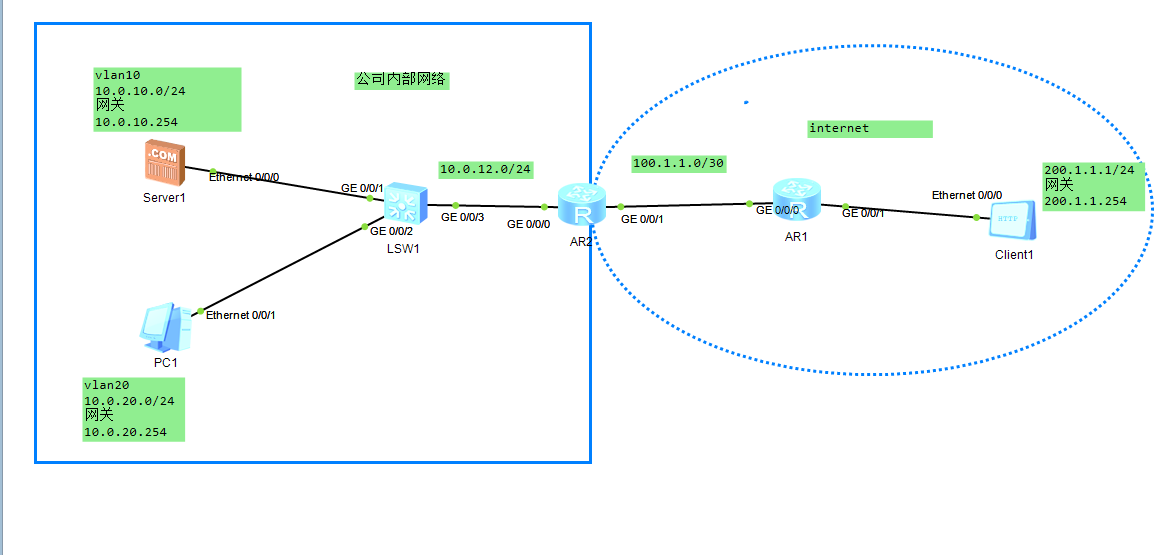
配置nat 让出口设备访问公网,
让AR2 可以访问,client1,
配置net ,
zai SW1上操作,配置好ip ,.划分好vlan
修改设备名字
sysname SW1
<Huawei>
<Huawei>
<Huawei>sy
Enter system view, return user view with Ctrl+Z.
[Huawei]syname SW1
        ^
Error: Unrecognized command found at '^' position.
[Huawei]sysname SW1
[SW1]
Jul 26 2026 15:38:54-08:00 SW1 DS/4/DATASYNC_CFGCHANGE:OID 1.3.6.1.4.1.2011.5.25
.191.3.1 configurations have been changed. The current change number is 4, the c
hange loop count is 0, and the maximum number of records is 4095.
[SW1]undo inf
[SW1]undo info-center en
[SW1]undo info-center enable
Info: Information center is disabled.
[SW1]vlan ba
[SW1]vlan batch 10 20   划分vlan
Info: This operation may take a few seconds. Please wait for a moment...done.
[SW1]int vl
[SW1]int Vlanif 10
[SW1-Vlanif10]ip addr	   设置vlan 网关
[SW1-Vlanif10]ip address 10.0.10.254 24
[SW1-Vlanif10]q
[SW1]int vla
[SW1]int Vlanif 20
[SW1-Vlanif20]ip addr
[SW1-Vlanif20]ip address 10.0.20.254 24
[SW1-Vlanif20]q
[SW1]int g0/0/1
[SW1-GigabitEthernet0/0/1]po
[SW1-GigabitEthernet0/0/1]port li
[SW1-GigabitEthernet0/0/1]port link-t
[SW1-GigabitEthernet0/0/1]port link-type a
[SW1-GigabitEthernet0/0/1]port link-type access   设置接口模式,access
[SW1-GigabitEthernet0/0/1]por
[SW1-GigabitEthernet0/0/1]port de
[SW1-GigabitEthernet0/0/1]port default v
[SW1-GigabitEthernet0/0/1]port default vlan 10     给接口1划分vlan
[SW1-GigabitEthernet0/0/1]q
[SW1]int g0/0/2
[SW1-GigabitEthernet0/0/2]po
[SW1-GigabitEthernet0/0/2]port li
[SW1-GigabitEthernet0/0/2]port link-t
[SW1-GigabitEthernet0/0/2]port link-type ac
[SW1-GigabitEthernet0/0/2]port link-type access
[SW1-GigabitEthernet0/0/2][pr
[SW1-GigabitEthernet0/0/2]po
[SW1-GigabitEthernet0/0/2]port de
[SW1-GigabitEthernet0/0/2]port default v
[SW1-GigabitEthernet0/0/2]port default vlan 20    给接口2 划分vlan


[SW1-GigabitEthernet0/0/2]
/
在AR2 上操作
<Huawei>
<Huawei>sy
Enter system view, return user view with Ctrl+Z.
[Huawei]sysname AR2
[AR2]int g0/0/0
[AR2-GigabitEthernet0/0/0]ip add
[AR2-GigabitEthernet0/0/0]ip address  10.0.12.2 24
Jul 26 2026 15:49:17-08:00 AR2 %%01IFNET/4/LINK_STATE(l)[0]:The line protocol IP
 on the interface GigabitEthernet0/0/0 has entered the UP state.
[AR2-GigabitEthernet0/0/0]q
[AR2]int g0/0/1
[AR2-GigabitEthernet0/0/1]ip addr
[AR2-GigabitEthernet0/0/1]ip address 100.1.1.2 30
Jul 26 2026 15:50:09-08:00 AR2 %%01IFNET/4/LINK_STATE(l)[1]:The line protocol IP
 on the interface GigabitEthernet0/0/1 has entered the UP state.
[AR2-GigabitEthernet0/0/1]q
[AR2]
在AR1操作
<Huawei>sy
Enter system view, return user view with Ctrl+Z.
[Huawei]sysna
[Huawei]sysname AR1
[AR1]int g0/0/0
[AR1-GigabitEthernet0/0/0]ip addr
[AR1-GigabitEthernet0/0/0]ip address 100.1.1.1 30
[AR1-GigabitEthernet0/0/0]
Jul 26 2026 15:52:02-08:00 AR1 %%01IFNET/4/LINK_STATE(l)[0]:The line protocol IP
 on the interface GigabitEthernet0/0/0 has entered the UP state.
[AR1-GigabitEthernet0/0/0]q
[AR1]int 0/0/1
         ^
Error: Wrong parameter found at '^' position.
[AR1]int g0/0/1
[AR1-GigabitEthernet0/0/1]ip add 200.1.1.254 24
Jul 26 2026 15:53:02-08:00 AR1 %%01IFNET/4/LINK_STATE(l)[1]:The line protocol IP
 on the interface GigabitEthernet0/0/1 has entered the UP state.
[AR1-GigabitEthernet0/0/1]
不使用ospf 使用静态就可以了,拓扑不复杂
因为模拟的是公网,所以配置缺省路由,
AR2]ip route-static 0.0.0.0 0 100.1.1.1[AR2]ip route-static 10.0.10.0 24 10.0.12.1 静态路由,
[AR2]ip route-static 10.0.20.0 24 10.0.12.1
[AR2]display ip routing-table 查看路由表,
Route Flags: R - relay, D - download to fib
------------------------------------------------------------------------------
Routing Tables: Public
Destinations : 12 Routes : 12
Destination/Mask Proto Pre Cost Flags NextHop Interface
10.0.10.0/24 Static 60 0 RD 10.0.12.1 GigabitEthernet
0/0/0
10.0.12.0/24 Direct 0 0 D 10.0.12.2 GigabitEthernet
0/0/0
10.0.12.2/32 Direct 0 0 D 127.0.0.1 GigabitEthernet
0/0/0
10.0.12.255/32 Direct 0 0 D 127.0.0.1 GigabitEthernet
0/0/0
10.0.20.0/24 Static 60 0 RD 10.0.12.1 GigabitEthernet
0/0/0
100.1.1.0/30 Direct 0 0 D 100.1.1.2 GigabitEthernet
0/0/1
100.1.1.2/32 Direct 0 0 D 127.0.0.1 GigabitEthernet
0/0/1
100.1.1.3/32 Direct 0 0 D 127.0.0.1 GigabitEthernet
0/0/1
127.0.0.0/8 Direct 0 0 D 127.0.0.1 InLoopBack0
127.0.0.1/32 Direct 0 0 D 127.0.0.1 InLoopBack0
127.255.255.255/32 Direct 0 0 D 127.0.0.1 InLoopBack0
255.255.255.255/32 Direct 0 0 D 127.0.0.1 InLoopBack0
[AR2]ip route-static 0.0.0.0 100.1.1.1
^
Error:Incomplete command found at '^' position.
[AR2]ping 200.1.1.1
PING 200.1.1.1: 56 data bytes, press CTRL_C to break
Request time out
Request time out
Request time out
Request time out
Request time out
--- 200.1.1.1 ping statistics ---
5 packet(s) transmitted
0 packet(s) received
100.00% packet loss
[AR2]ip rou
[AR2]ip route-s
[AR2]ip route-static 0.0.0.0 0 100.1.1.1
[AR2]ping 200.1.1.1
PING 200.1.1.1: 56 data bytes, press CTRL_C to break
Request time out
Reply from 200.1.1.1: bytes=56 Sequence=2 ttl=254 time=30 ms
Reply from 200.1.1.1: bytes=56 Sequence=3 ttl=254 time=10 ms
Reply from 200.1.1.1: bytes=56 Sequence=4 ttl=254 time=20 ms
Reply from 200.1.1.1: bytes=56 Sequence=5 ttl=254 time=20 ms
--- 200.1.1.1 ping statistics ---
5 packet(s) transmitted
4 packet(s) received
20.00% packet loss
round-trip min/avg/max = 10/20/30 ms
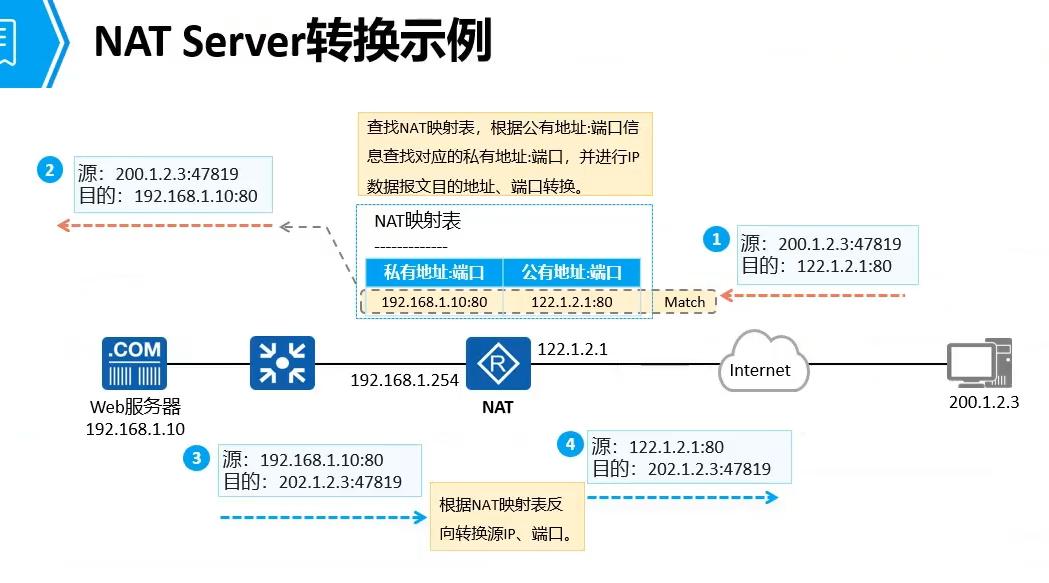
先配置静态net ,但是,是1-1映射,理解
AR2]int g0/0/1
[AR2-GigabitEthernet0/0/1]nat sta
[AR2-GigabitEthernet0/0/1]nat static ?
  enable    Enable function
  global    Specify global information of NAT
  protocol  Specify protocol
[AR2-GigabitEthernet0/0/1]nat static go
[AR2-GigabitEthernet0/0/1]nat static g
[AR2-GigabitEthernet0/0/1]nat static global 100.1.1.2 ?
  inside  Specify inside information of NAT
[AR2-GigabitEthernet0/0/1]nat static global 100.1.1.2 om
[AR2-GigabitEthernet0/0/1]nat static global 100.1.1.2 in
[AR2-GigabitEthernet0/0/1]nat static global 100.1.1.2 inside ?
  IP_ADDR<X.X.X.X>  Inside IP address of NAT
[AR2-GigabitEthernet0/0/1]nat static global 100.1.1.2 inside 10.0.10.1  报错这个ip 已经使用了,
  Error: The address conflicts with interface or ARP IP.
#
=============================================================
interface GigabitEthernet0/0/1
 ip address 100.1.1.2 255.255.255.252
#
return
[AR2-GigabitEthernet0/0/1]ip add
[AR2-GigabitEthernet0/0/1]ip address 100.1.1.2.24
[AR2-GigabitEthernet0/0/1]nat static global 100.1.1.3 inside 10.0.10.1
100.1.1.3是新买的,ip有局限,
SW1]dis ip routing-table
Route Flags: R - relay, D - download to fib
------------------------------------------------------------------------------
Routing Tables: Public
         Destinations : 9        Routes : 9

Destination/Mask    Proto   Pre  Cost      Flags NextHop         Interface

        0.0.0.0/0   Static  60   0          RD   10.0.12.2       Vlanif1
      10.0.10.0/24  Direct  0    0           D   10.0.10.254     Vlanif10
    10.0.10.254/32  Direct  0    0           D   127.0.0.1       Vlanif10
      10.0.12.0/24  Direct  0    0           D   10.0.12.1       Vlanif1
      10.0.12.1/32  Direct  0    0           D   127.0.0.1       Vlanif1
      10.0.20.0/24  Direct  0    0           D   10.0.20.254     Vlanif20
    10.0.20.254/32  Direct  0    0           D   127.0.0.1       Vlanif20
      127.0.0.0/8   Direct  0    0           D   127.0.0.1       InLoopBack0
      127.0.0.1/32  Direct  0    0           D   127.0.0.1       InLoopBack0

没有去公网的路由
[AR2-GigabitEthernet0/0/1]uodo ip addr
[AR2-GigabitEthernet0/0/1]nat sta
[AR2-GigabitEthernet0/0/1]nat static gl
[AR2-GigabitEthernet0/0/1]nat static global 100.1.1.3 ins
[AR2-GigabitEthernet0/0/1]nat static global 100.1.1.3 inside 10.0.10.1
[AR2-GigabitEthernet0/0/1]nat sta
[AR2-GigabitEthernet0/0/1]nat static go
[AR2-GigabitEthernet0/0/1]nat static g
[AR2-GigabitEthernet0/0/1]nat static global 100.1.1.4 in
[AR2-GigabitEthernet0/0/1]nat static global 100.1.1.4 inside 10.0.20.1
[AR2-GigabitEthernet0/0/1]dis this
我遇见的错误是,我把网关10.0.10.254 写成了,100.0.10.254 ,.需要严谨,啊
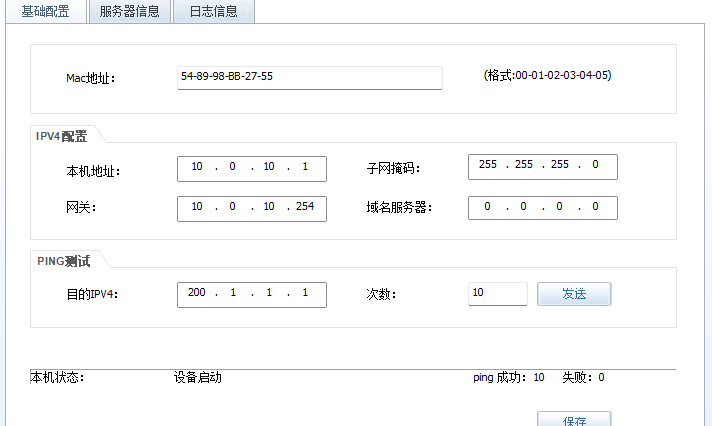
动态,nat
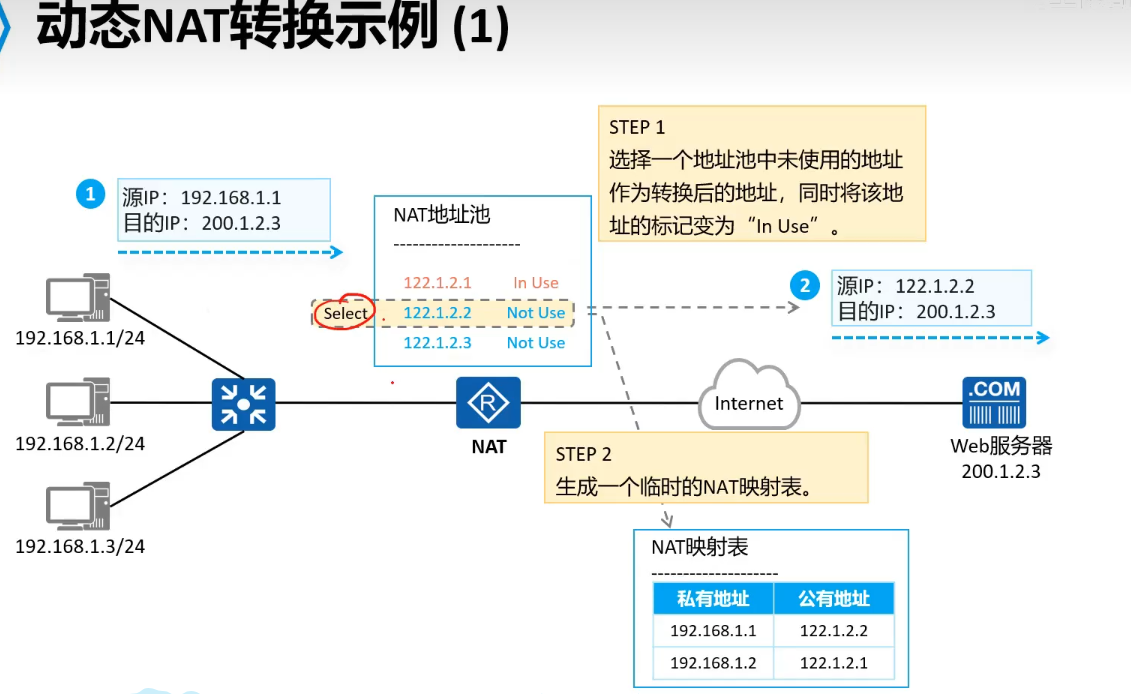
动态是先到先得,不用的,熟悉即可,不节省,
naPT
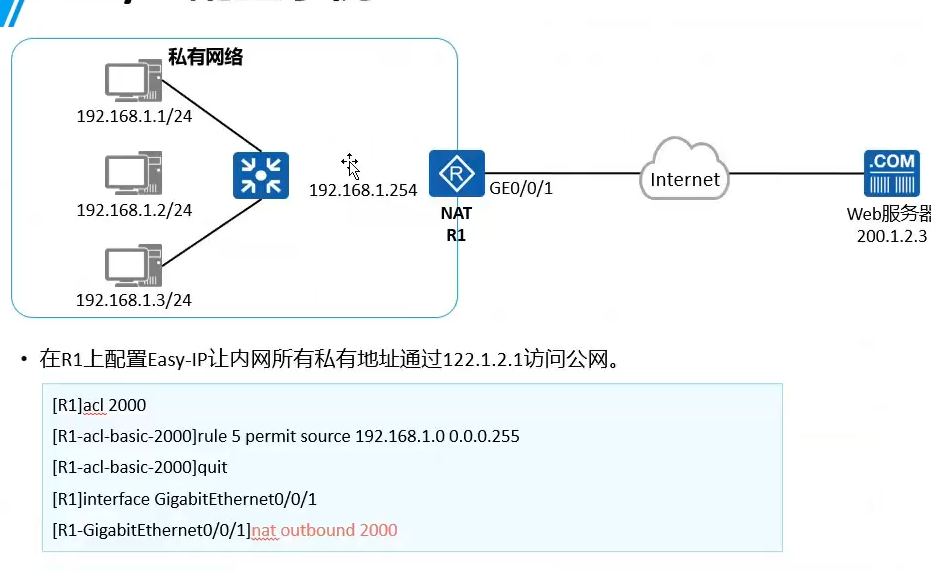
让出口设备可以访问公网,
ip route-static 0.0.0.0 100.1.1.1 访问公网的路由
nat address-group 0 100.1.1.2 100.1.1.2配置NAPT,配置地址池,也就是运营商给的ip
配置acl 匹配需要访问公网的流量,
acl 2000
[AR2-acl-basic-2000]rule permit source 10.0.10.0 0.0.0.255
[AR2-acl-basic-2000]rule permit source 10.0.20.0 0.0.0.255
[AR2-GigabitEthernet0/0/1]dis this
[V200R003C00]
#
interface GigabitEthernet0/0/1
 ip address 100.1.1.2 255.255.255.0
 nat static global 100.1.1.3 inside 10.0.10.1 netmask 255.255.255.255
 nat static global 100.1.1.4 inside 10.0.20.1 netmask 255.255.255.255
 nat static enable
#
return
[AR2-GigabitEthernet0/0/1]undo nat static global 100.1.1.3 inside 10.0.10.1 netm
ask 255.255.255.255
[AR2-GigabitEthernet0/0/1]
[AR2-GigabitEthernet0/0/1] undo nat static global 100.1.1.4 inside 10.0.20.1 net
mask 255.255.255.255
[AR2-GigabitEthernet0/0/1]
[AR2-GigabitEthernet0/0/1]q
[AR2]nat add
[AR2]nat address-group ?
  INTEGER<0-7>  Index of address-group
[AR2]nat address-group 0 100.1.1.2 100.1.1.2
[AR2]acl 2000 r
[AR2]acl 2000
[AR2-acl-basic-2000]r
[AR2-acl-basic-2000]reset ?
  aaa             AAA
  anti-attack     Specify anti-attack configurations
  lacp            Link aggregation control protocol
  slot            Slot
  stp             Specify Spanning Tree Protocol (STP) configuration information
  traffic-filter  Filter packets based on acl
[AR2-acl-basic-2000]ru
[AR2-acl-basic-2000]rule pe
[AR2-acl-basic-2000]rule permit sou
[AR2-acl-basic-2000]rule permit source 10.0.10.0 0.0.0.255
[AR2-acl-basic-2000]rul
[AR2-acl-basic-2000]rule pe
[AR2-acl-basic-2000]rule permit sou
[AR2-acl-basic-2000]rule permit source 10.0.20.0 0.0.0.255
[AR2]int g0/0/1
[AR2-GigabitEthernet0/0/1]nat out
[AR2-GigabitEthernet0/0/1]nat outbound ?
  INTEGER<2000-3999>  Apply basic or advanced ACL
[AR2-GigabitEthernet0/0/1]nat outbound 2000 ad
[AR2-GigabitEthernet0/0/1]nat outbound 2000 address-group 0   这里报错了,地址池,和接口ip 不能一一样,
  Error: The address conflicts with interface or ARP IP.
[AR2-GigabitEthernet0/0/1]q
[AR2]undo nat add
[AR2]undo nat address-group 0
[AR2]nat add
[AR2]nat address-group 0 100.1.1.3 100.1.1.3
[AR2]int g0/0/1
[AR2-GigabitEthernet0/0/1]na
[AR2-GigabitEthernet0/0/1]nat ou
[AR2-GigabitEthernet0/0/1]nat outbound 2000 ad
[AR2-GigabitEthernet0/0/1]nat outbound 2000 address-group 0
[AR2-GigabitEthernet0/0/1]
在接口调用地址池的ip
[AR2]int g0/0/1
[AR2-GigabitEthernet0/0/1]na
[AR2-GigabitEthernet0/0/1]nat ou
[AR2-GigabitEthernet0/0/1]nat outbound 2000 ad
[AR2-GigabitEthernet0/0/1]nat outbound 2000 address-group 0
easy ip
[AR2-GigabitEthernet0/0/1]dis this 查看配置,
[V200R003C00]
#
interface GigabitEthernet0/0/1
 ip address 100.1.1.2 255.255.255.0
 nat outbound 2000 address-group 0
 nat static enable
#
return
[AR2-GigabitEthernet0/0/1]undo nat outbound 2000 address-group 0  删除
[AR2-GigabitEthernet0/0/1]
[AR2-GigabitEthernet0/0/1]dis this
[V200R003C00]
#
interface GigabitEthernet0/0/1
 ip address 100.1.1.2 255.255.255.0
 nat static enable
#
return
[AR2-GigabitEthernet0/0/1]q
[AR2]undo nat add
[AR2]undo nat address-group 0  删除,
[AR2]
AR2]int g0/0/1
[AR2-GigabitEthernet0/0/1]nat ou
[AR2-GigabitEthernet0/0/1]nat outbound 2000
[AR2-GigabitEthernet0/0/1]dis this
[V200R003C00]
#
interface GigabitEthernet0/0/1
 ip address 100.1.1.2 255.255.255.0
 nat outbound 2000
 nat static enable
#
[AR2-GigabitEthernet0/0/1]q
[AR2]acl 2000
配置需要访问公网的流量,
[AR2-acl-basic-2000]dis this
[V200R003C00]
#
acl number 2000
rule 5 permit source 10.0.10.0 0.0.0.255
rule 10 permit source 10.0.20.0 0.0.0.255
#
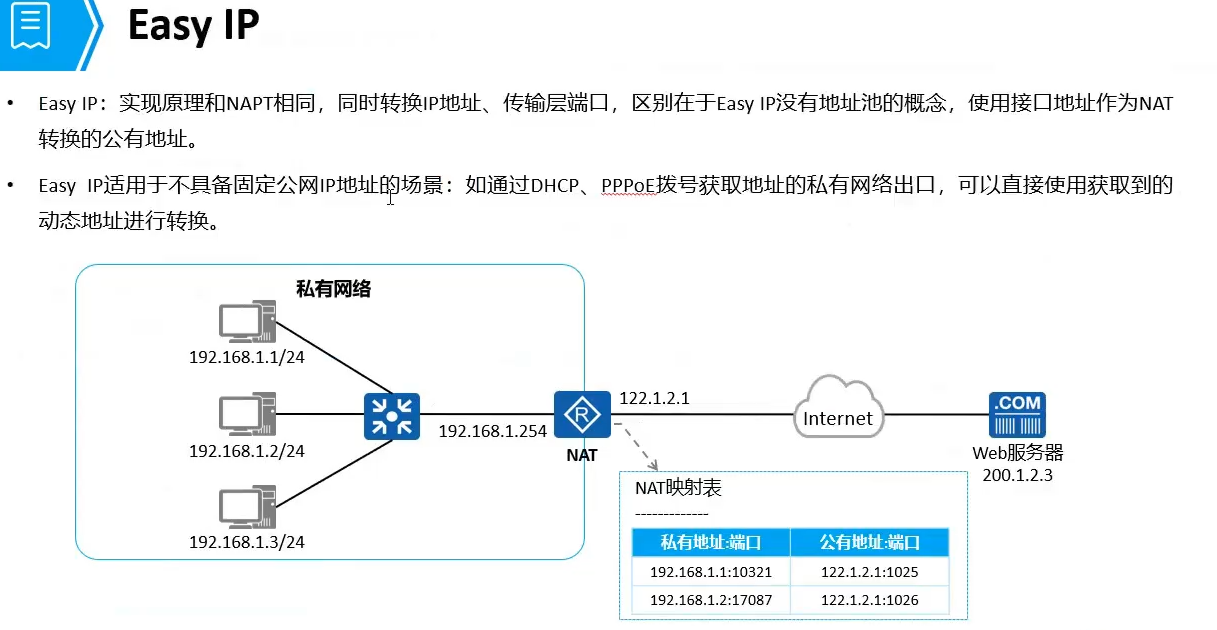
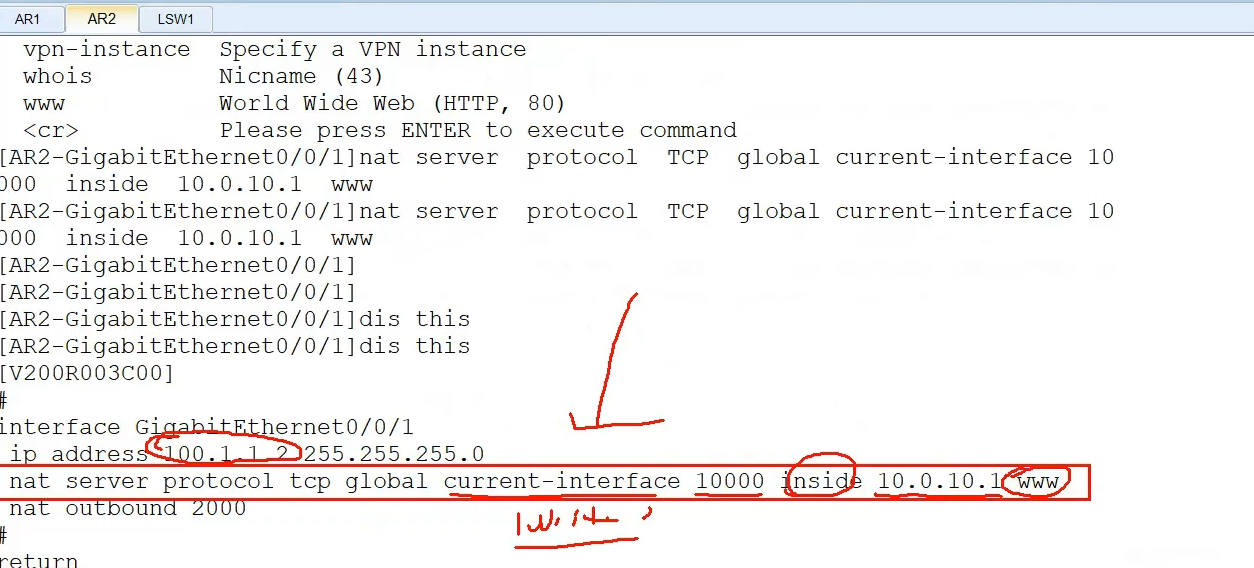
nat 地址转换
本文采用 CC BY-NC-SA 4.0 许可协议,转载请注明出处。
评论交流
欢迎留下你的想法