


1,centos 7 可以联网,
# 备份旧源
mv /etc/yum.repos.d/CentOS-Base.repo /etc/yum.repos.d/CentOS-Base.repo.bak
# 下载阿里可用CentOS7源
curl -o /etc/yum.repos.d/CentOS-Base.repo https://mirrors.aliyun.com/repo/Centos-7.repo
# 重建缓存
yum clean all && yum makecache
然后重启reboot
安装跨版本升级工具 ELevate
重启后进入系统,执行:
bash
运行
yum install -y https://repo.almalinux.org/elevate/elevate-release-latest-el7.noarch.rpm
yum install -y leapp-upgrade leapp-data-rocky
    5. Detected custom leapp actors or files.
    6. Module pam_pkcs11 will be removed from PAM configuration

Reports summary:
    Errors:                      0
    Inhibitors:                  1
    HIGH severity reports:       5
    MEDIUM severity reports:     1
    LOW severity reports:        3
    INFO severity reports:       2

Before continuing, review the full report below for details about discovered problems and possible remediation instructions:
    A report has been generated at /var/log/leapp/leapp-report.txt
    A report has been generated at /var/log/leapp/leapp-report.json

============================================================
                   END OF REPORT OVERVIEW
============================================================

Answerfile has been generated at /var/log/leapp/answerfile


[root@localhost ~]#
[root@localhost ~]# cat /var/log/leapp/leapp-report.txt
Risk Factor: high (inhibitor)
Title: Leapp detected loaded kernel drivers which have been removed in RHEL 8. Upgrade cannot proceed.
Summary: Support for the following RHEL 7 device drivers has been removed in RHEL 8:
     - pata_acpi

Related links:
    - Leapp preupgrade getting "Inhibitor: Detected loaded kernel drivers which have been removed in RHEL 8. Upgrade cannot proceed." : https://access.redhat.com/solutions/6971716
    - Leapp upgrade fail with error "Inhibitor: Detected loaded kernel drivers which have been removed in RHEL 8. Upgrade cannot proceed.": https://access.redhat.com/solutions/5436131
Key: f08a07da902958defa4f5c2699fae9ec2eb67c5b
----------------------------------------
Risk Factor: high
Title: Leapp detected loaded kernel drivers which are no longer maintained in RHEL 8.
Summary: The following RHEL 7 device drivers are no longer maintained RHEL 8:
     - e1000
     - e1000

Key: 0ff2413fd3cb0358736bf9be597f4dbdf58f2c4d
----------------------------------------
Risk Factor: high
Title: Leapp detected a processor which is no longer maintained in RHEL 8.
Summary: The following processors are no longer maintained in RHEL 8:
     - IVYBRIDGE

Key: 61eb181bbc56328fbe03b5229d25a8ea5ebdc7a2
----------------------------------------
Risk Factor: high
Title: GRUB2 core will be automatically updated during the upgrade
Summary: On legacy (BIOS) systems, GRUB2 core (located in the gap between the MBR and the first partition) cannot be updated during the rpm transaction and Leapp has to initiate the update running "grub2-install" after the transaction. No action is needed before the upgrade. After the upgrade, it is recommended to check the GRUB configuration.
Key: ac7030e05d2ee248d34f08a9fa040b352bc410a3
----------------------------------------
Risk Factor: high
Title: Difference in Python versions and support in RHEL 8
Summary: In RHEL 8, there is no 'python' command. Python 3 (backward incompatible) is the primary Python version and Python 2 is available with limited support and limited set of packages. If you no longer require Python 2 packages following the upgrade, please remove them. Read more here: https://red.ht/rhel-8-python
Related links:
    - Difference in Python versions and support in RHEL 8: https://red.ht/rhel-8-python
Remediation: [hint] Please run "alternatives --set python /usr/bin/python3" after upgrade
Key: 0c98585b1d8d252eb540bf61560094f3495351f5
----------------------------------------
Risk Factor: high
Title: Detected custom leapp actors or files.
Summary: We have detected installed custom actors or files on the system. These can be provided e.g. by third party vendors, Red Hat consultants, or can be created by users to customize the upgrade (e.g. to migrate custom applications). This is allowed and appreciated. However Red Hat is not responsible for any issues caused by these custom leapp actors. Note that upgrade tooling is under agile development which could require more frequent update of custom actors.
The list of custom leapp actors and files:
    - /usr/share/leapp-repository/repositories/system_upgrade/common/files/rpm-gpg/8/RPM-GPG-KEY-Rocky-8
Related links:
    - Customizing your Red Hat Enterprise Linux in-place upgrade: https://red.ht/customize-rhel-upgrade
Remediation: [hint] In case of any issues connected to custom or third party actors, contact vendor of such actors. Also we suggest to ensure the installed custom leapp actors are up to date, compatible with the installed packages.
Key: 2064870018370ce2bde3f977cf753ed8c59848d0
----------------------------------------
Risk Factor: medium
Title: Module pam_pkcs11 will be removed from PAM configuration
Summary: Module pam_pkcs11 was surpassed by SSSD and therefore it was removed from RHEL-8. Keeping it in PAM configuration may lock out the system thus it will be automatically removed from PAM configuration before upgrading to RHEL-8. Please switch to SSSD to recover the functionality of pam_pkcs11.
Remediation: [hint] Configure SSSD to replace pam_pkcs11
Key: bf47e7305d6805e8bbeaa7593cf01e38030c23f3
----------------------------------------
Risk Factor: low
Title: SElinux will be set to permissive mode
Summary: SElinux will be set to permissive mode. Current mode: enforcing. This action is required by the upgrade process to make sure the upgraded system can boot without beinig blocked by SElinux rules.
Remediation: [hint] Make sure there are no SElinux related warnings after the upgrade and enable SElinux manually afterwards. Notice: You can ignore the "/root/tmp_leapp_py3" SElinux warnings.
Key: 39d7183dafba798aa4bbb1e70b0ef2bbe5b1772f
----------------------------------------
Risk Factor: low
Title: Grep has incompatible changes in the next major version
Summary: If a file contains data improperly encoded for the current locale, and this is discovered before any of the file's contents are output, grep now treats the file as binary.
The 'grep -P' no longer reports an error and exits when given invalid UTF-8 data. Instead, it considers the data to be non-matching.
In locales with multibyte character encodings other than UTF-8, grep -P now reports an error and exits instead of misbehaving.
When searching binary data, grep now may treat non-text bytes as line terminators. This can boost performance significantly.
The 'grep -z' no longer automatically treats the byte '\200' as binary data.
Context no longer excludes selected lines omitted because of -m. For example, 'grep "^" -m1 -A1' now outputs the first two input lines, not just the first line.

Remediation: [hint] Please update your scripts to be compatible with the changes.
Key: 94665a499e2eeee35eca3e7093a7abe183384b16
----------------------------------------
Risk Factor: low
Title: Postfix has incompatible changes in the next major version
Summary: Postfix 3.x has so called "compatibility safety net" that runs Postfix programs with backwards-compatible default settings. It will log a warning whenever backwards-compatible default setting may be required for continuity of service. Based on this logging the system administrator can decide if any backwards-compatible settings need to be made permanent in main.cf or master.cf, before turning off the backwards-compatibility safety net.
The backward compatibility safety net is by default turned off in Red Hat Enterprise Linux 8.
It can be turned on by running:  "postconf -e compatibility_level=0
It can be turned off by running: "postconf -e compatibility_level=2

In the Postfix MySQL database client, the default "option_group" value has changed to "client", i.e. it now reads options from the [client] group from the MySQL configuration file. To disable it, set "option_group" to the empty string.

The postqueue command no longer forces all message arrival times to be reported in UTC. To get the old behavior, set TZ=UTC in main.cf:import_environment.

Postfix 3.2 enables elliptic curve negotiation. This changes the default smtpd_tls_eecdh_grade setting to "auto", and introduces a new parameter "tls_eecdh_auto_curves" with the names of curves that may be negotiated.

The "master.cf" chroot default value has changed from "y" (yes) to "n" (no). This applies to master.cf services where chroot field is not explicitly specified.

The "append_dot_mydomain" default value has changed from "yes" to "no". You may need changing it to "yes" if senders cannot use complete domain names in e-mail addresses.

The "relay_domains" default value has changed from "$mydestination" to the empty value. This could result in unexpected "Relay access denied" errors or ETRN errors, because now will postfix by default relay only for the localhost.

The "mynetworks_style" default value has changed from "subnet" to "host". This parameter is used to implement the "permit_mynetworks" feature. The change could result in unexpected "access denied" errors, because postfix will now by default trust only the local machine, not the remote SMTP clients on the same IP subnetwork.

Postfix now supports dynamically loaded database plugins. Plugins are shipped in individual RPM sub-packages. Correct database plugins have to be installed, otherwise the specific database client will not work. For example for PostgreSQL map to work, the postfix-pgsql RPM package has to be installed.

Key: 5721e0a07a67d82cf7e5ea6f17662cd4f82e0a33
----------------------------------------
Risk Factor: info
Title: SElinux relabeling will be scheduled
Summary: SElinux relabeling will be scheduled as the status is permissive/enforcing.
Key: 8fb81863f8413bd617c2a55b69b8e10ff03d7c72
----------------------------------------
Risk Factor: info
Title: Current PAM and nsswitch.conf configuration will be kept.
Summary: There is a new tool called authselect in RHEL8 that replaced authconfig. The upgrade process was unable to find an authselect profile that would be equivalent to your current configuration. Therefore your configuration will be left intact.
Key: 40c4ab1da4a30dc1ca40e543f6385e1336d8810c
----------------------------------------
Leapp detected loaded kernel drivers which have been removed in RHEL 8. Upgrade cannot proceed.
加载了 RHEL8 彻底移除的内核驱动:
pata_acpi
原因
pata_acpi 是老式 IDE 硬盘控制器驱动,Rocky8/RHEL8 内核完全删除该驱动,当前系统仍加载此模块,升级程序直接拦截。
完整修复步骤
rmmod pata_acpi
禁止开机自动加载该驱动(永久屏蔽)
bash
运行
echo "blacklist pata_acpi" >> /etc/modprobe.d/blacklist.conf
echo "install pata_acpi /bin/false" >> /etc/modprobe.d/blacklist.conf
重建内核引导镜像,防止开机重新加载
bash
运行
dracut -f /boot/initramfs-$(uname -r).img $(uname -r)
重启系统清空驱动缓存
e1000 网卡驱动不再维护
虚拟网卡 e1000 在 Rocky8 仅保留兼容,建议升级后更换为
virtio-net网卡(虚拟机设置调整网卡型号)。CPU IvyBridge(四代酷睿)不再官方维护
RHEL8 官方不再支持 IvyBridge 架构 CPU,原地升级可强制放行,但存在底层兼容隐患;
如需跳过硬件检测执行:
bash
运行
leapp answer --section check_cpu.confirm=TruePython 版本变更
Rocky8 无
python软链接,默认 python3,升级完成后执行alternatives --set python /usr/bin/python3恢复习惯用法。自定义 Rocky8 Leapp 密钥文件
自带 Rocky 升级源密钥,属于正常自定义文件,无需处理。
GRUB 自动更新
BIOS 主板升级时自动重装 grub,无需前置操作,升级后检查启动项即可。
三、中等风险提示(需确认应答)
Module pam_pkcs11 will be removed from PAM configuration
执行这条命令确认,消除该提示:
bash
运行
leapp answer --section remove_pam_pkcs11_module_check.confirm=True
四、低 / INFO 级提示(完全无需前置处理,升级后按需调整)
SELinux 临时宽松模式、开机自动重打标签
grep 命令语法行为变更,升级后脚本异常再修改
Postfix 邮件服务大量默认参数改动,无邮件服务可直接忽略
PAM 认证配置保留原有文件,不会破坏登录
修复完成后执行流程
重启完成,登录系统
执行 CPU 硬件检测放行(IvyBridge 必须)
bash
运行
leapp answer --section check_cpu.confirm=True
确认 pam 模块冲突
bash
运行
leapp answer --section remove_pam_pkcs11_module_check.confirm=True
重新预检
bash
运行
leapp preupgradereboot
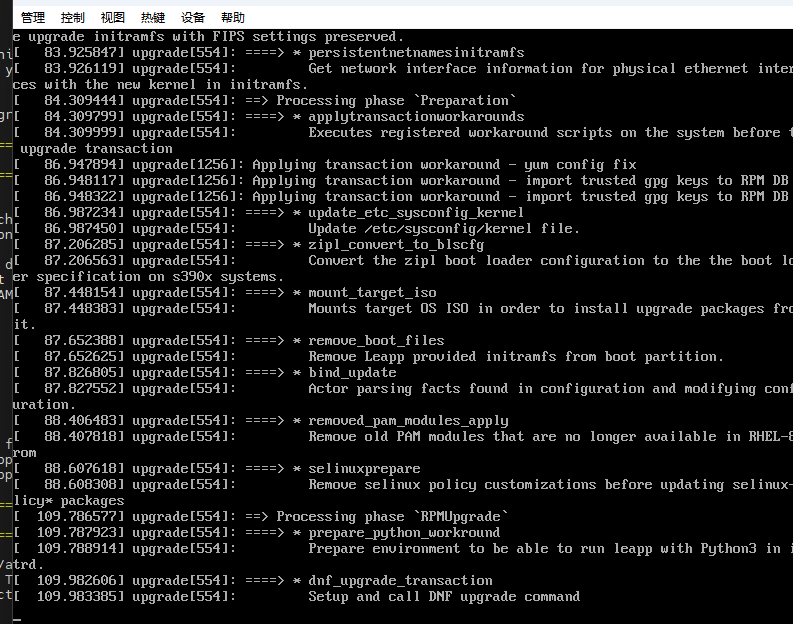
重启后流程
开机不再进 CentOS7 登录界面,自动进入 ELevate 升级界面,全自动替换系统为 Rocky Linux 8
升级全程不要断电,等待自动完成并二次重启
重启完成后,系统就是 Rocky 8,登录后执行收尾适配命令:
bash
运行
# 配置python软链接
alternatives --set python /usr/bin/python3
# 恢复SELinux强制模式
setenforce 1
sed -i 's/SELINUX=permissive/SELINUX=enforcing/' /etc/selinux/config
重启完毕知后
[root@localhost ~]# cat /etc/redhat-release
Rocky Linux release 8.10 (Green Obsidian)
[root@localhost ~]# uname -r
4.18.0-553.144.1.el8_10.x86_64
[root@localhost ~]# dnf remove $(rpm -qa | grep el7) -y

由于您的搜索参数,所有相关结果都已被滤掉: python2-leapp-0.18.0-2.el7.noarch
由于您的搜索参数,所有相关结果都已被滤掉: leapp-upgrade-el7toel8-0.21.0-5.el7.elevate.5.noarch
由于您的搜索参数,所有相关结果都已被滤掉: leapp-0.18.0-2.el7.noarch
依赖关系解决。
==============================================================================================================================================================================================================
 软件包                                       架构                                         版本                                                           仓库                                           大小
==============================================================================================================================================================================================================
移除:
 kernel                                       x86_64                                       3.10.0-957.el7                                                 @System                                        63 M
 kernel                                       x86_64                                       3.10.0-1160.119.1.el7                                          @System                                        66 M

事务概要
==============================================================================================================================================================================================================
移除  2 软件包

将会释放空间:129 M
运行事务检查
事务检查成功。
运行事务测试
事务测试成功。
运行事务
  准备中  :                                                                                                                                                                                               1/1
  运行脚本: kernel-3.10.0-1160.119.1.el7.x86_64                                                                                                                                                           1/2
  删除    : kernel-3.10.0-1160.119.1.el7.x86_64                                                                                                                                                           1/2
  运行脚本: kernel-3.10.0-1160.119.1.el7.x86_64                                                                                                                                                           1/2
  运行脚本: kernel-3.10.0-957.el7.x86_64                                                                                                                                                                  2/2
  删除    : kernel-3.10.0-957.el7.x86_64                                                                                                                                                                  2/2
  运行脚本: kernel-3.10.0-957.el7.x86_64                                                                                                                                                                  2/2
  验证    : kernel-3.10.0-957.el7.x86_64                                                                                                                                                                  1/2
  验证    : kernel-3.10.0-1160.119.1.el7.x86_64                                                                                                                                                           2/2

已移除:
  kernel-3.10.0-957.el7.x86_64                                                                       kernel-3.10.0-1160.119.1.el7.x86_64

完毕!
备份旧 repo
 mkdir /etc/yum.repos.d/bak
mv /etc/yum.repos.d/*.repo /etc/yum.repos.d/bak/

重新配置 Rocky8 本地离线源:
mkdir /etc/yum.repos.d/bak
[root@localhost ~]# mv /etc/yum.repos.d/*.repo /etc/yum.repos.d/bak/
[root@localhost ~]# vi /etc/yum.repos.d/rocky8-local.repo
[root@localhost ~]# cat /etc/yum.repos.d/rocky8-local.repo
[rocky-BaseOS]
name=Rocky8 BaseOS Offline
baseurl=file:///mnt/data/rocky8/BaseOS
enabled=1
gpgcheck=0

[rocky-AppStream]
name=Rocky8 AppStream Offline
baseurl=file:///mnt/data/rocky8/AppStream
enabled=1
gpgcheck=0
[root@localhost ~]# dnf clean all && dnf makecache
0 个文件已删除
Rocky8 BaseOS Offline                                                                                                                                                         0.0  B/s |   0  B     00:00
Errors during downloading metadata for repository 'rocky-BaseOS':
  - Curl error (37): Couldn't read a file:// file for file:///mnt/data/rocky8/BaseOS/repodata/repomd.xml [Couldn't open file /mnt/data/rocky8/BaseOS/repodata/repomd.xml]
错误:为仓库 'rocky-BaseOS' 下载元数据失败 : Cannot download repomd.xml: Cannot download repodata/repomd.xml: All mirrors were tried
[root@localhost ~]# ls -ld /mnt/data/rocky8/BaseOS
ls: 无法访问'/mnt/data/rocky8/BaseOS': No such file or directory
[root@localhost ~]# ls /mnt/data/rocky8/BaseOS/repodata/repomd.xml
ls: 无法访问'/mnt/data/rocky8/BaseOS/repodata/repomd.xml': No such file or directory
[root@localhost ~]# cat /etc/yum.repos.d/rocky8-local.rep
cat: /etc/yum.repos.d/rocky8-local.rep: No such file or directory
[root@localhost ~]# mkdir -p /opt/repo
[root@localhost ~]# tar -zxvf /root/centos7-rocky8-offline-repo.tar.gz -C /opt/repo/
tar (child): /root/centos7-rocky8-offline-repo.tar.gz:无法 open: No such file or directory
tar (child): Error is not recoverable: exiting now
tar: Child returned status 2
tar: Error is not recoverable: exiting now
[root@localhost ~]# find / -name "centos7-rocky8-offline-repo.tar.gz"


找回完整离线仓库压缩包(全量 BaseOS+AppStream 源)

1. 先查找压缩包位置
bash
运行
# 全盘搜索离线tar包
find / -name "centos7-rocky8-offline-repo.tar.gz"
如果搜索到路径,替换 tar 命令里的路径重新解压
我们查找不到,
如果找不到,需要重新在外网机器打包一份,拷贝到内网服务器
2. 找到后解压到永久目录
bash
运行
# 示例:如果find查到在 /mnt/usb/centos7-rocky8-offline-repo.tar.gz
tar -zxvf /mnt/usb/centos7-rocky8-offline-repo.tar.gz -C /opt/repo/
3. 新建正确 repo 配置文件
bash
运行
vi /etc/yum.repos.d/rocky8-full.repo
ini
[rocky-BaseOS]
name=Rocky8 BaseOS Offline
baseurl=file:///opt/repo/data/rocky8/BaseOS
enabled=1
gpgcheck=0

[rocky-AppStream]
name=Rocky8 AppStream Offline
baseurl=file:///opt/repo/data/rocky8/AppStream
enabled=1
gpgcheck=0
4. 重建缓存
bash
运行
dnf clean all && dnf makecache
下面我们利用另外i一种方法,直接从官网下载rockey ,8.0
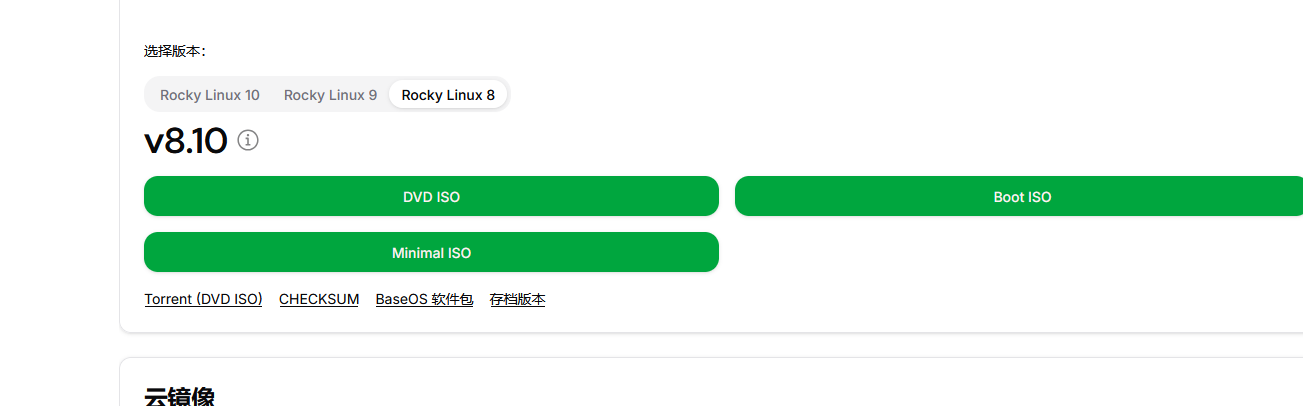
:用 Rocky8 DVD 镜像做临时离线源(立刻能用,无需大压缩包)
1. 上传镜像文件
把 Rocky-8.10-x86_64-dvd.iso 通过 U 盘 / 内网共享传到服务器 /root 目录
2. 创建永久挂载目录并挂载 ISO
bash
运行
mkdir -p /opt/rocky-dvd
mount -o loop /root/Rocky-8.10-x86_64-dvd.iso /opt/rocky-dvd
3. 创建正确后缀的 repo 文件
bash
运行
vi /etc/yum.repos.d/rocky-dvd.repo
写入内容:
ini
cat /etc/yum.repos.d/rocky8-dvd.repo
[rocky8-BaseOS]
name=Rocky Linux 8.10 DVD BaseOS
baseurl=file:///opt/rocky8-dvd/BaseOS
enabled=1
gpgcheck=0

[rocky8-AppStream]
name=Rocky Linux 8.10 DVD AppStream
baseurl=file:///opt/rocky8-dvd/AppStream
enabled=1
gpgcheck=0
保存:ESC → :wq 回车
二、完整修复步骤
步骤 1:删除所有旧的失效 repo 文件
bash
运行
# 备份全部旧仓库文件到bak目录
mkdir -p /etc/yum.repos.d/bak
mv /etc/yum.repos.d/*.repo /etc/yum.repos.d/bak/
# 只保留当前正常的DVD源文件
cp /etc/yum.repos.d/bak/rocky8-dvd.repo /etc/yum.repos.d/
ls /etc/yum.repos.d/
bak  CentOS-Base.repo.bak  CentOS-Base.repo.rpmsave  rocky8-dvd.repo
4. 验证 dnf 可用
bash
运行
dnf clean all && dnf makecache
# dnf clean all && dnf makecache
13 个文件已删除
Rocky Linux 8.10 DVD BaseOS                                                                                                                                                    63 MB/s | 2.7 MB     00:00
Rocky Linux 8.10 DVD AppStream                                                                                                                                                 39 MB/s | 9.8 MB     00:00
上次元数据过期检查:0:00:02 前,执行于 2026年07月17日 星期五 12时47分07秒。
元数据缓存已建立。
无报错即可正常安装软件,满足基础系统修复需求。
sudo mkdir -p /etc/yum.repos.d/bak
sudo mv /etc/yum.repos.d/*.repo /etc/yum.repos.d/bak/
2. 写入完整阿里云 Rocky8 源(适配 8.10,$releasever 自动识别 8)
bash
运行
sudo tee /etc/yum.repos.d/aliyun-rocky8.repo > /dev/null <<'EOF'
[BaseOS]
name=Rocky Linux $releasever - BaseOS - Aliyun
baseurl=https://mirrors.aliyun.com/rockylinux/$releasever/BaseOS/$basearch/os/
enabled=1
gpgcheck=1
gpgkey=https://mirrors.aliyun.com/rockylinux/RPM-GPG-KEY-rockyofficial

[AppStream]
name=Rocky Linux $releasever - AppStream - Aliyun
baseurl=https://mirrors.aliyun.com/rockylinux/$releasever/AppStream/$basearch/os/
enabled=1
gpgcheck=1
gpgkey=https://mirrors.aliyun.com/rockylinux/RPM-GPG-KEY-rockyofficial

[Extras]
name=Rocky Linux $releasever - Extras - Aliyun
baseurl=https://mirrors.aliyun.com/rockylinux/$releasever/extras/$basearch/os/
enabled=1
gpgcheck=1
gpgkey=https://mirrors.aliyun.com/rockylinux/RPM-GPG-KEY-rockyofficial

[PowerTools]
name=Rocky Linux $releasever - PowerTools - Aliyun
baseurl=https://mirrors.aliyun.com/rockylinux/$releasever/PowerTools/$basearch/os/
enabled=1
gpgcheck=1
gpgkey=https://mirrors.aliyun.com/rockylinux/RPM-GPG-KEY-rockyofficial
EOF
3. 刷新缓存
bash
运行
sudo dnf clean all && sudo dnf makecache
配套配置阿里云 EPEL 源(必备扩展软件源)
Rocky8 默认不带 epel,安装工具、nginx、redis 等需要:
安装 epel-release
bash
运行
sudo dnf install -y https://mirrors.aliyun.com/epel/epel-release-latest-8.noarch.rpm
替换 epel 为阿里源
bash
运行
sudo sed -e 's|^mirrorlist=|#mirrorlist=|g' \
-e 's|^#baseurl=https://download.fedoraproject.org|baseurl=https://mirrors.aliyun.com|g' \
-i.bak /etc/yum.repos.d/epel*.repo
再次更新缓存
bash
运行
sudo dnf makecache
验证源是否生效
bash
运行
# 查看仓库列表,出现mirrors.aliyun.com即成功
dnf repolist
# 测试安装软件
sudo dnf install -y tree
  169  df -h
  170  cp /etc/yum.repos.d/bak/rocky8-dvd.repo /etc/yum.repos.d/
  171  sudo mkdir -p /etc/yum.repos.d/bak
  172  sudo mv /etc/yum.repos.d/*.repo /etc/yum.repos.d/bak/
  173  sudo tee /etc/yum.repos.d/aliyun-rocky8.repo > /dev/null <<'EOF'
[BaseOS]
name=Rocky Linux $releasever - BaseOS - Aliyun
baseurl=https://mirrors.aliyun.com/rockylinux/$releasever/BaseOS/$basearch/os/
enabled=1
gpgcheck=1
gpgkey=https://mirrors.aliyun.com/rockylinux/RPM-GPG-KEY-rockyofficial

[AppStream]
name=Rocky Linux $releasever - AppStream - Aliyun
baseurl=https://mirrors.aliyun.com/rockylinux/$releasever/AppStream/$basearch/os/
enabled=1
gpgcheck=1
gpgkey=https://mirrors.aliyun.com/rockylinux/RPM-GPG-KEY-rockyofficial

[Extras]
name=Rocky Linux $releasever - Extras - Aliyun
baseurl=https://mirrors.aliyun.com/rockylinux/$releasever/extras/$basearch/os/
enabled=1
gpgcheck=1
gpgkey=https://mirrors.aliyun.com/rockylinux/RPM-GPG-KEY-rockyofficial

[PowerTools]
name=Rocky Linux $releasever - PowerTools - Aliyun
baseurl=https://mirrors.aliyun.com/rockylinux/$releasever/PowerTools/$basearch/os/
enabled=1
gpgcheck=1
gpgkey=https://mirrors.aliyun.com/rockylinux/RPM-GPG-KEY-rockyofficial
EOF

  174  sudo dnf clean all && sudo dnf makecache
  175  sudo dnf install -y https://mirrors.aliyun.com/epel/epel-release-latest-8.noarch.rpm
  176  sudo sed -e 's|^mirrorlist=|#mirrorlist=|g' -e 's|^#baseurl=https://download.fedoraproject.org|baseurl=https://mirrors.aliyun.com|g' -i.bak /etc/yum.repos.d/epel*.repo
  177  sudo dnf makecache
  178  history
[root@localhost ~]#
centos 7 升级到rockey8
本文采用 CC BY-NC-SA 4.0 许可协议,转载请注明出处。
评论交流
欢迎留下你的想法